> For the complete documentation index, see [llms.txt](https://docs.lan.kokomocloud.com/llms.txt). Markdown versions of documentation pages are available by appending `.md` to page URLs; this page is available as [Markdown](https://docs.lan.kokomocloud.com/notification-and-alerts/configuring-alert-settings.md).
# アラートの設定
特定のネットワークやデバイスイベントが発生した際にメールアラートを送信するためのオプションがいくつも用意されています。
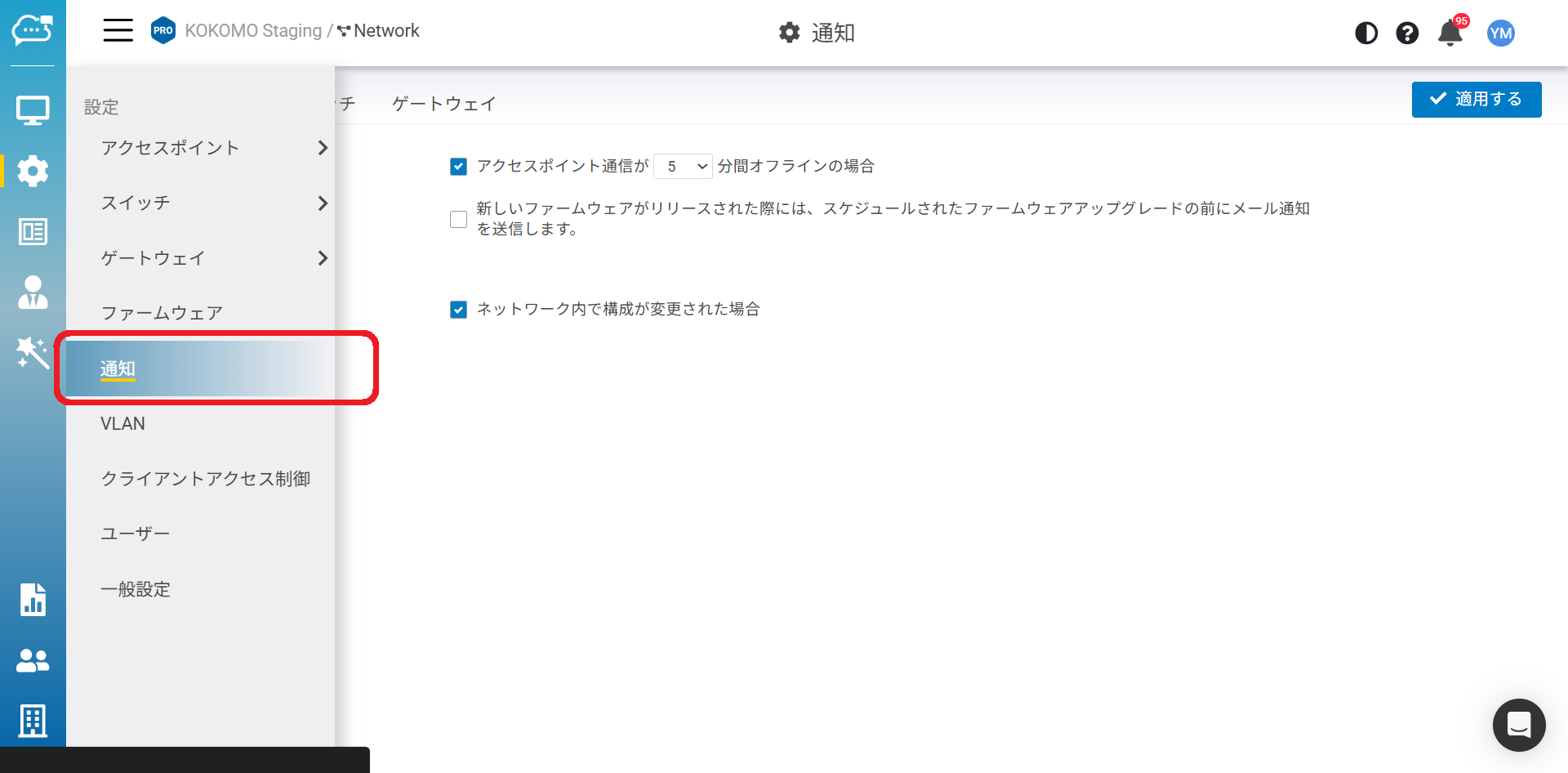
アラートは「**設定**」>「**通知**」から設定できます。
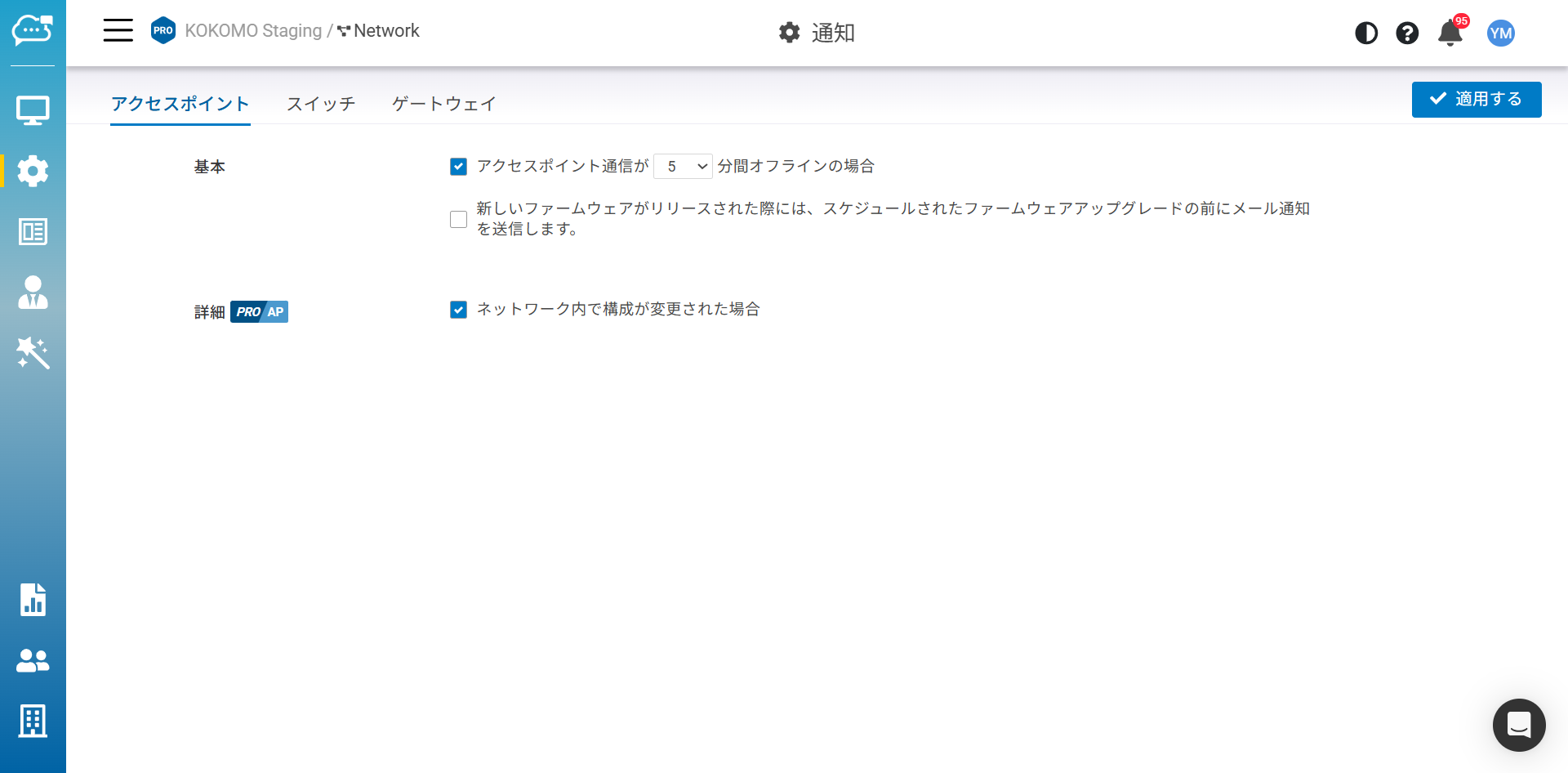
## アクセスポイントのアラート
以下のアクセスポイントのイベントに対してアラートを設定できます:
* **アクセスポイント通信がXXX分間オフラインの場合**:1つ以上のアクセスポイントが事前設定済み(カスタマイズ可能)の時間にわたってオフラインになった場合にメールを送信します。
* **新しいファームウェアがリリースされた際には、スケジュールされたファームウェアアップグレードの前にメール通知を送信します。**:新しいファームウェアがリリースされた際に、予定されたファームウェアアップグレードが実行される前にメールを送信します。
* **ネットワーク内で構成が変更された場合**:SSID、無線設定、ファームウェアアップグレード、または個々のデバイス設定がデフォルト設定をオーバーライドした場合にメールを送信します。
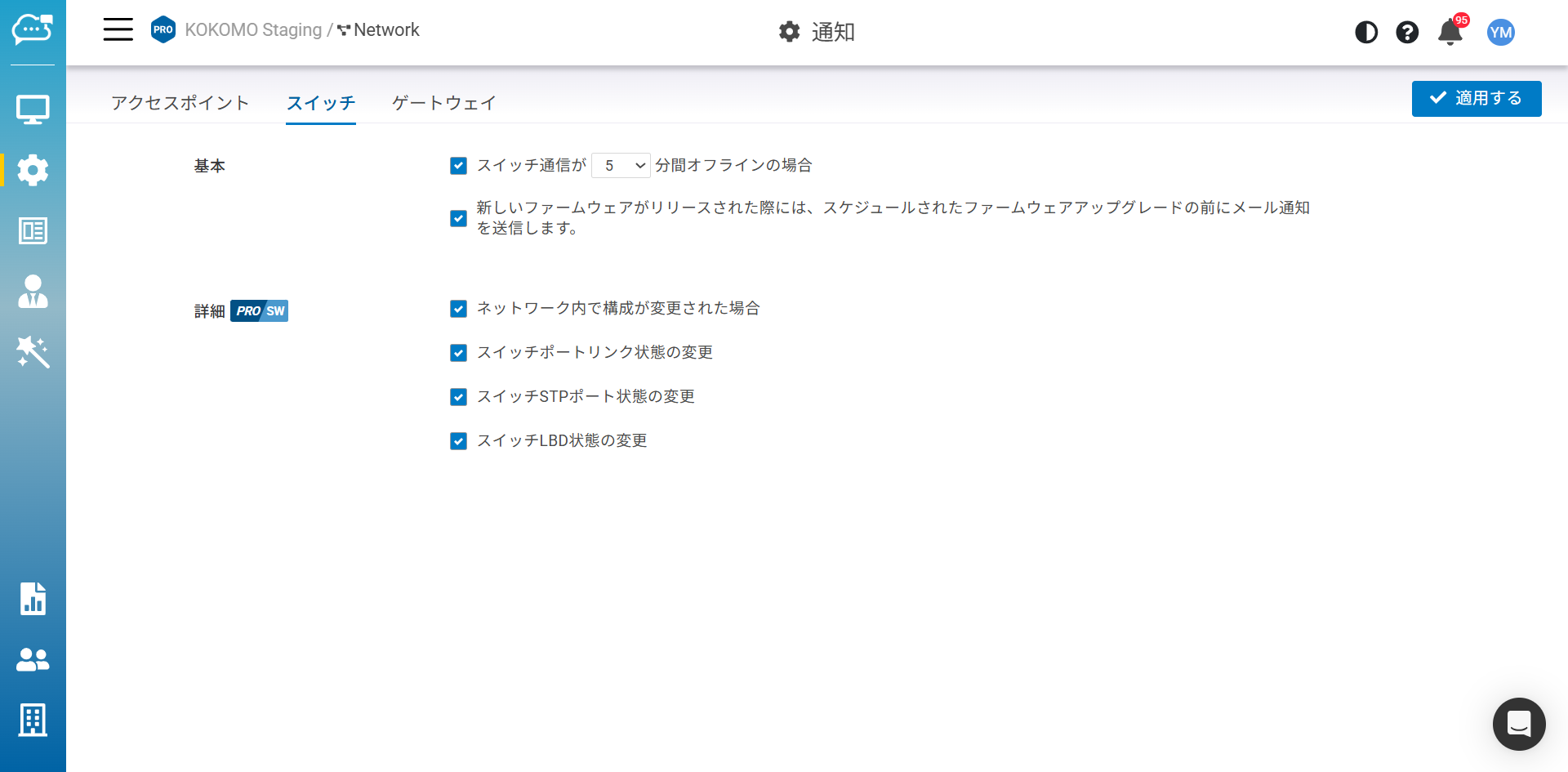
## スイッチのアラート
以下のスイッチのイベントに対してアラートを設定できます:
* **スイッチ通信がXXX分間オフラインの場合**:1つ以上のスイッチが事前設定済み(カスタマイズ可能)の時間にわたってオフラインになった場合にメールを送信します。
* **新しいファームウェアがリリースされた際には、スケジュールされたファームウェアアップグレードの前にメール通知を送信します。**:新しいファームウェアがリリースされた際に、予定されたファームウェアアップグレードが実行される前にメールを送信します。
* **ネットワーク内で構成が変更された場合**:有線設定、ファームウェアアップグレード、または個々のデバイス設定がデフォルト設定をオーバーライドした場合にメールを送信します。
* **スイッチポートリンク状態の変更**:デバイスポートのリンクステータスが変更された際にメールを送信します。
* **スイッチSTPポート状態の変更**:デバイスポートのSTPステータスが変更された際にメールを送信します。
* **スイッチLBD状態の変更**:デバイスのLBDステータスが変更された際にメールを送信します。
## ゲートウェイのアラート(未サポート)
{% hint style="danger" %}
ゲートウェイは2025年度末にリリース予定です。
{% endhint %}
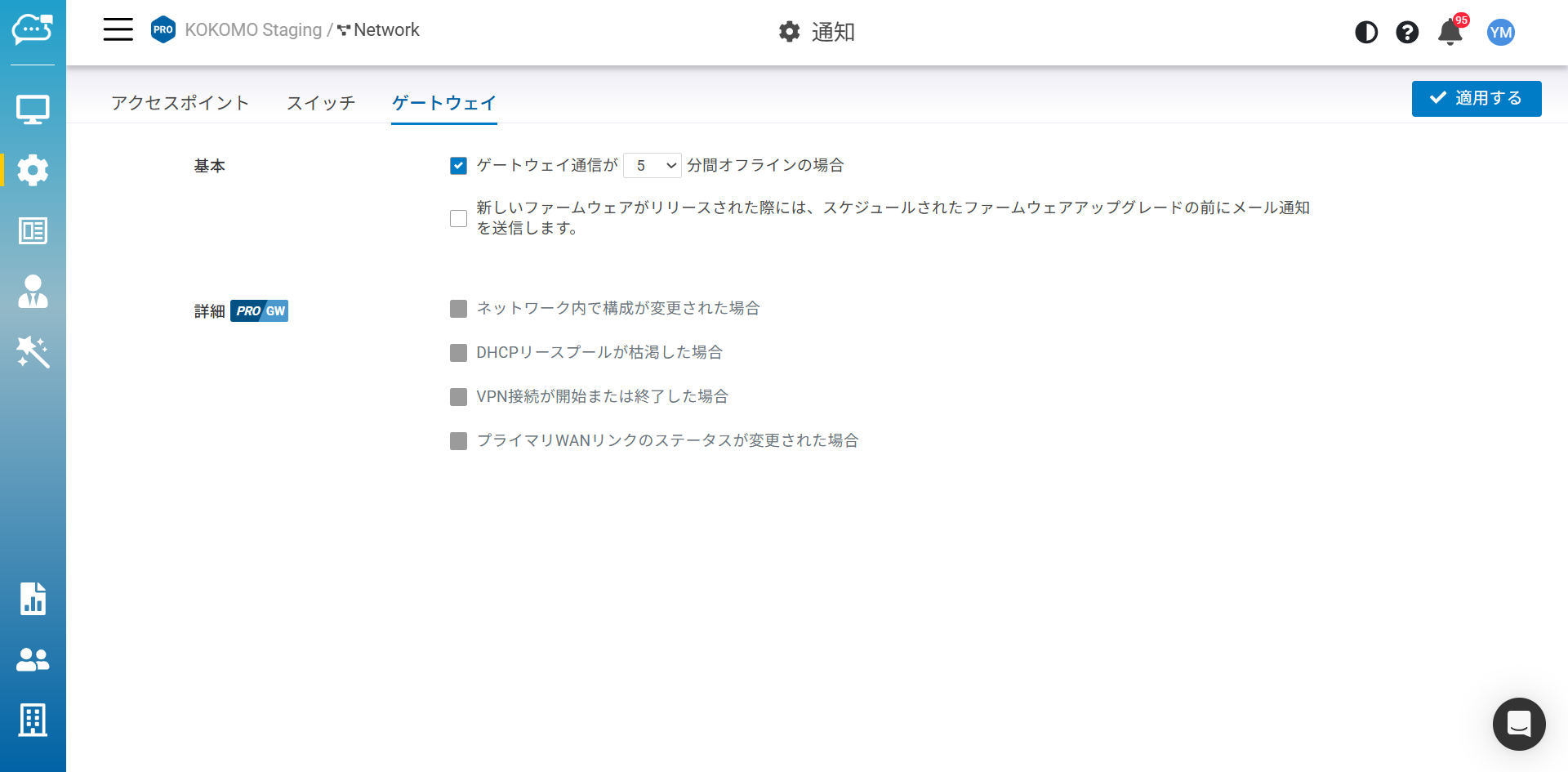
以下のKOKOMOゲートウェイのイベントに対してアラートを設定できます:
* **ゲートウェイ通信がXXX分間オフラインの場合**:設定した時間(分)にわたってゲートウェイがクラウドから到達不能になった場合にメールを送信します。ゲートウェイはまだ動作している可能性がありますが、クラウドと通信できていない状態を示します。
* **新しいファームウェアがリリースされた際には、スケジュールされたファームウェアアップグレードの前にメール通知を送信します。**:新しいファームウェアがリリースされた際に、予定されたファームウェアアップグレードが実行される前にメールを送信します。
* **ネットワーク内で構成が変更された場合**:有線設定、ファームウェアアップグレード、または個々のデバイス設定がデフォルト設定をオーバーライドした場合にメールを送信します。
* **DHCPリースプールが枯渇した場合**:ゲートウェイが設定されたDHCPスコープ内で利用可能なIPを使い果たし、要求するクライアントにIPアドレスを提供できない状態を示します。
* **VPN接続が開始または終了した場合**:VPN接続が確立または切断された場合にメールを送信します。
* **プライマリWANリンクのステータスが変更された場合**:フェイルオーバーイベントやリンクダウンなど、プライマリアップリンクのステータスが変更された場合にメールを送信します。
{% hint style="danger" %}
ゲートウェイは2025年度末にリリース予定です。
{% endhint %}
---
# Agent Instructions
This documentation is published with GitBook. GitBook is the documentation platform designed so that both humans and AI agents can read, navigate, and reason over technical content effectively. Learn more at gitbook.com.
## Querying This Documentation
If you need additional information that is not directly available in this page, you can query the documentation by asking a question.
Perform an HTTP GET request on the following URL with the `ask` and `goal` query parameters:
```
GET https://docs.lan.kokomocloud.com/notification-and-alerts/configuring-alert-settings.md?ask=&goal=
```
`ask` is the immediate question: it should be specific, self-contained, and written in natural language.
`goal` is what the user is ultimately trying to achieve, the reason they need the answer. Sharing it helps GitBook give you a better, more relevant answer. A goal is most helpful when it describes the outcome the user wants rather than restating the question. For example, with `ask=how do I create an API token`, a goal like `automate deployments from our CI pipeline` lets GitBook tailor the answer to that use case.
The response will contain a direct answer to the question and relevant excerpts and sources from the documentation.
Use this mechanism when the answer is not explicitly present in the current page, you need clarification or additional context, or you want to retrieve related documentation sections.