> For the complete documentation index, see [llms.txt](https://docs.lan.kokomocloud.com/llms.txt). Markdown versions of documentation pages are available by appending `.md` to page URLs; this page is available as [Markdown](https://docs.lan.kokomocloud.com/get-remote-support.md).
# リモートサポートを受ける
## ライブチャット
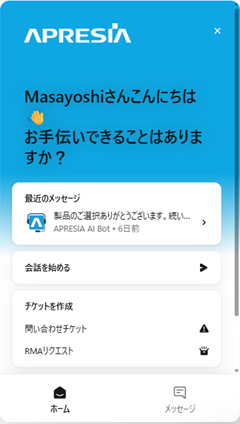
システムにログインすると、ページの右下には常にライブチャットボタンがあります。
このチャットシステムにメッセージを残すことができます。KOKOMOサポートチームから、通常、数分以内に返答があります。
ライブチャットの詳細に関しては、クイックスタートガイドの [**AIアシスタント**](/quick-start-guide/trouble-shooting/support.md#ai-assistant) セクションを参照ください。
## リモートサポートのパスコード
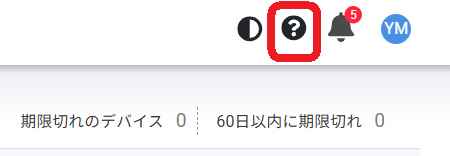
KOKOMOサポートのパスコードは、セキュリティ目的でユーザーの身元を確認するために使用されます。ネットワークの設定やクラウド設定の操作で問題が発生した場合は、メニューの右上の「**ヘルプ**」ボタンをクリックしてください。
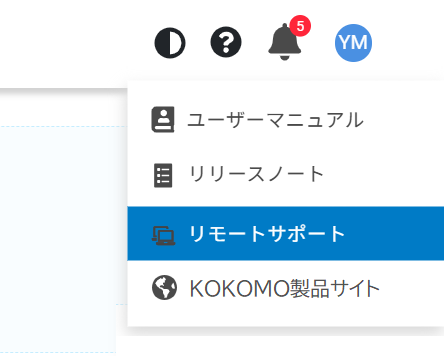
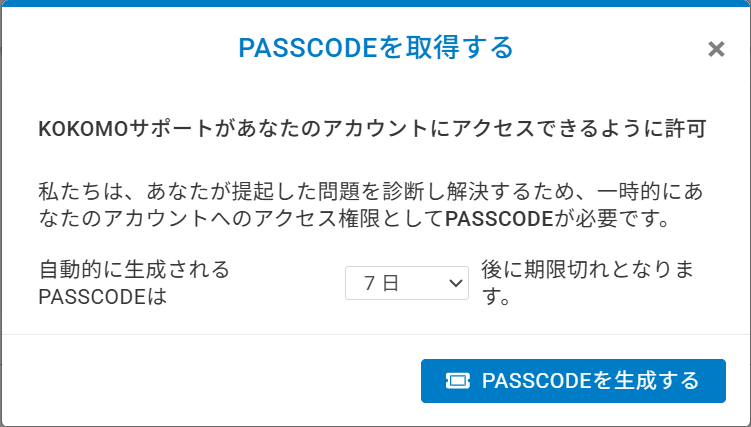
「**リモートサポート**」を選択し、「**パスコード生成**」をクリックします。
ここでは、生成されたパスコードの有効期間(1時間から7日間)を決定するオプションがあります。生成されたパスコードをライブチャットでKOKOMOサポートチームに送信することで、サポートチームは一時的にあなたのアカウントにアクセスし、提起された問題を診断および解決できます。
{% hint style="info" %}
なお、生成されたパスコードは一定期間後に自動的に失効します。パスコードが失効すると、サポートチームはあなたのリソースにアクセスできなくなります。
{% endhint %}
---
# Agent Instructions
This documentation is published with GitBook. GitBook is the documentation platform designed so that both humans and AI agents can read, navigate, and reason over technical content effectively. Learn more at gitbook.com.
## Querying This Documentation
If you need additional information that is not directly available in this page, you can query the documentation dynamically by asking a question.
Perform an HTTP GET request on the current page URL with the `ask` query parameter, and the optional `goal` query parameter:
```
GET https://docs.lan.kokomocloud.com/get-remote-support.md?ask=&goal=
```
`ask` is the immediate question: it should be specific, self-contained, and written in natural language.
`goal` is optional and describes the broader end goal you are ultimately trying to accomplish on behalf of the user. GitBook uses it to tailor the answer towards what is most useful for that goal.
The response will contain a direct answer to the question and relevant excerpts and sources from the documentation.
Use this mechanism when the answer is not explicitly present in the current page, you need clarification or additional context, or you want to retrieve related documentation sections.