> For the complete documentation index, see [llms.txt](https://docs.lan.kokomocloud.com/llms.txt). Markdown versions of documentation pages are available by appending `.md` to page URLs; this page is available as [Markdown](https://docs.lan.kokomocloud.com/standalone/settings/ssid/schedule.md).
# スケジュール
SSIDスケジュールは、アクセスポイントのSSIDの有効/無効を時間帯に応じて自動制御する機能です。
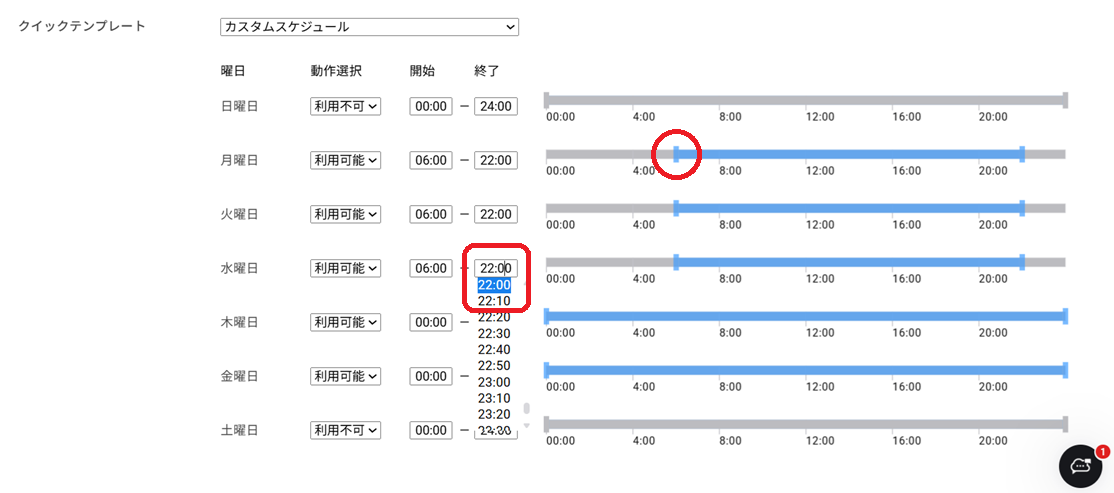
以下の画面で既存スケジュールが視覚的に表示されます。
曜日や時間帯により、当該SSIDの利用可否を制御します。ネットワーク環境のニーズに応じて柔軟な時間管理が可能です。
* 利用可能:設定した時間帯にSSIDが有効になります
* 利用不可:設定した時間帯にSSIDが無効になります
スケジュールを「**有効**」に設定し、クイックテンプレートもしくは個別に利用時間帯を設定します。
クイックテンプレートにはあらかじめ以下4つのパターンが登録されています。利用シーンにあわせてプルダウンで選択します。
* **常に利用可能**:全ての曜日・時間帯で利用可能
* **毎日午前8時から午後5時まで利用可能**:全ての曜日の午前8時~午後5時で利用可能
* **週末を除き、毎日午前8時から午後5時まで利用可能**:土日を除く午前8時~午後5時で利用可能
* **カスタムスケジュール:**バーをドラッグして利用時間帯をカスタマイズします。開始・終了時間が表示されているボックスをクリックして選択することも可能です。
スケジュール設定後、「**保存**」をクリックし、編集内容を保存します。
---
# Agent Instructions
This documentation is published with GitBook. GitBook is the documentation platform designed so that both humans and AI agents can read, navigate, and reason over technical content effectively. Learn more at gitbook.com.
## Querying This Documentation
If you need additional information that is not directly available in this page, you can query the documentation by asking a question.
Perform an HTTP GET request on the following URL with the `ask` and `goal` query parameters:
```
GET https://docs.lan.kokomocloud.com/standalone/settings/ssid/schedule.md?ask=&goal=
```
`ask` is the immediate question: it should be specific, self-contained, and written in natural language.
`goal` is what the user is ultimately trying to achieve, the reason they need the answer. Sharing it helps GitBook give you a better, more relevant answer. A goal is most helpful when it describes the outcome the user wants rather than restating the question. For example, with `ask=how do I create an API token`, a goal like `automate deployments from our CI pipeline` lets GitBook tailor the answer to that use case.
The response will contain a direct answer to the question and relevant excerpts and sources from the documentation.
Use this mechanism when the answer is not explicitly present in the current page, you need clarification or additional context, or you want to retrieve related documentation sections.