> For the complete documentation index, see [llms.txt](https://docs.lan.kokomocloud.com/llms.txt). Markdown versions of documentation pages are available by appending `.md` to page URLs; this page is available as [Markdown](https://docs.lan.kokomocloud.com/quick-start-guide/hardware-installation/ap-installation.md).
# アクセスポイントの設置
Wi-Fi 6モデルとWi-Fi 7モデルで取り付け方法が若干異なります。
{% hint style="info" %}
アクセスポイントの設置間隔は、送信電力や周辺環境よって変動します。ヒートマップ機能で電波シミュレーションを行うことで、設置間隔の判断材料として活用していただけます。
ヒートマップシミュレーションの詳細は、ユーザーマニュアルの [**ヒートマップシミュレーション**](broken://spaces/WPm8EyIrziJQuTvcgJ14/pages/-LhBNTpDcDFGNwuxF_ev#heatmap-simulation) を参照ください。
{% endhint %}
### 天井取り付け
* **KOKOMO-W220AX-IS**
* **KOKOMO-W440AX-IS**
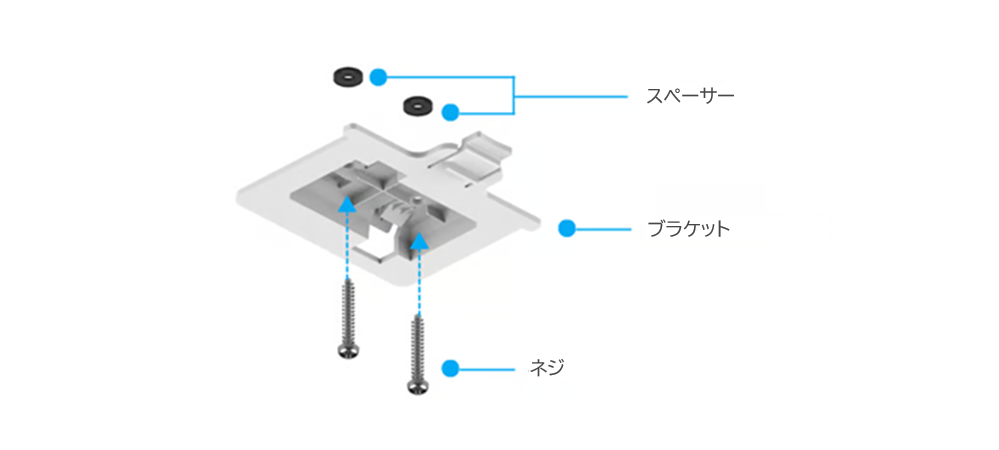
1. **スペーサー**を使用して**ブラケット**に付属の**ネジ**を取り付け、表面に**ネジ**を取り付けて表面と同じ高さになるまで締め込んでください。
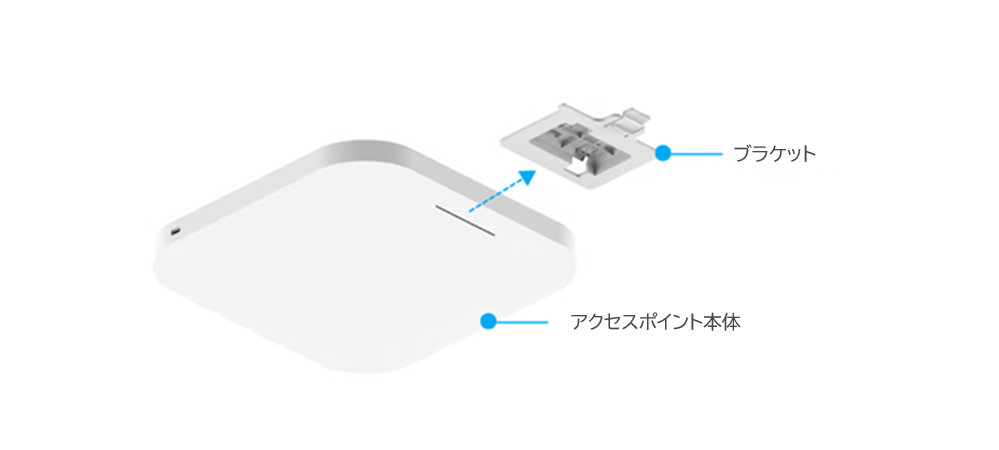
2. **アクセスポイント本体**を**ブラケット**にスライドさせます。
### 壁掛け取り付け
* **KOKOMO-W220AX-IS**
* **KOKOMO-W440AX-IS**
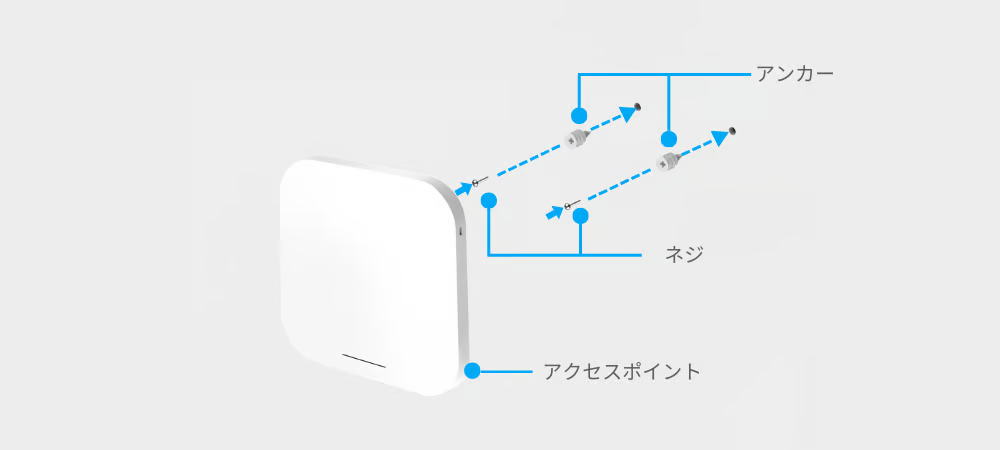
1. **アクセスポイント本体**を設置する場所を決定し、表面に取り付け穴の位置をマーキングします。適切なドリルビットを使用して、マーキングした場所に直径 8.1mm、深さ26mmの2つの穴を開けます。
2. **アンカー**を壁に埋め込むまで**ネジ**で回し、付属の**ネジ**を**アンカー**に回すが、**ネジ**の頭を外に出しておいて、**アクセスポイント本体**を吊るせるようにします。
3. スクリューヘッドに**アクセスポイント本体**を取り付けます。
### 天井および壁取り付け
* **KOKOMO-W222BE-IS**
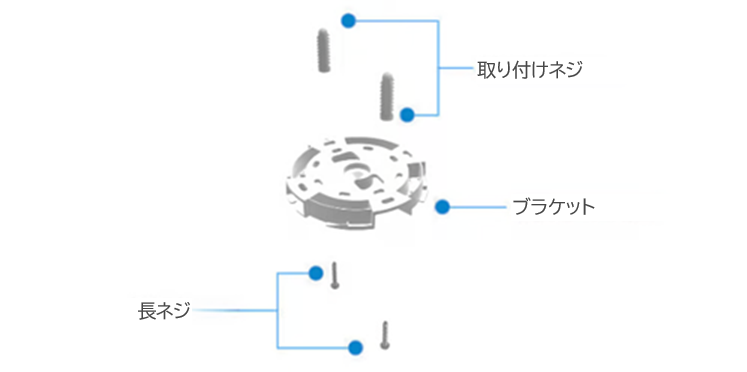
1. **アクセスポイント**を設置する場所を決定し、同梱の**取り付けキット**を使用して**ブラケット**を壁/天井に取り付けます。
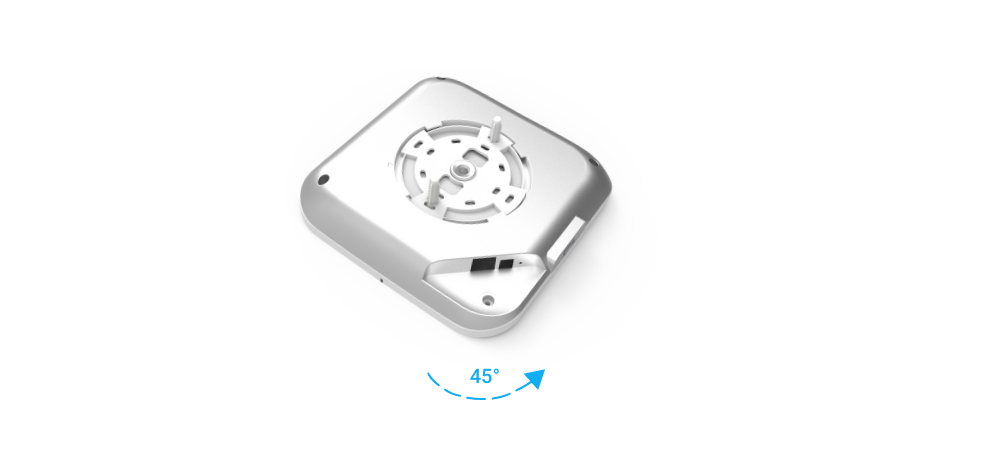
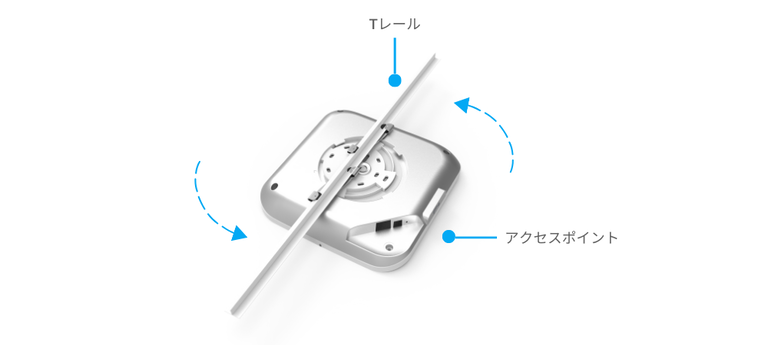
2. **アクセスポイント本体**を**ブラケット**に取り付けるために、ユニットを時計回りに約 45 度回転させて固定します。
### Tレイル取り付け
* **KOKOMO-W222BE-IS**
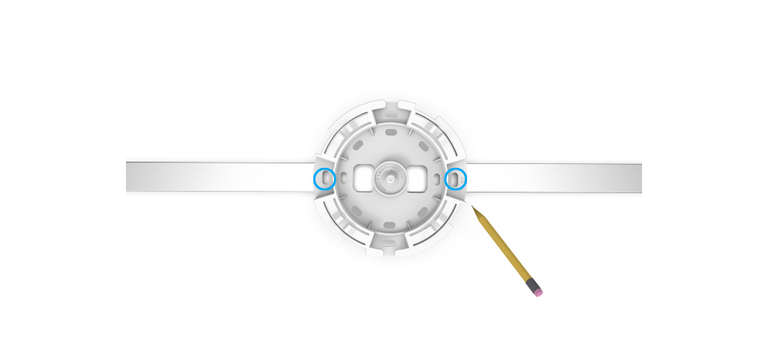
1. **ブラケット**の最も外側のねじ穴を使用して、TバーがTレイルに固定されるべき距離をマーキングします。
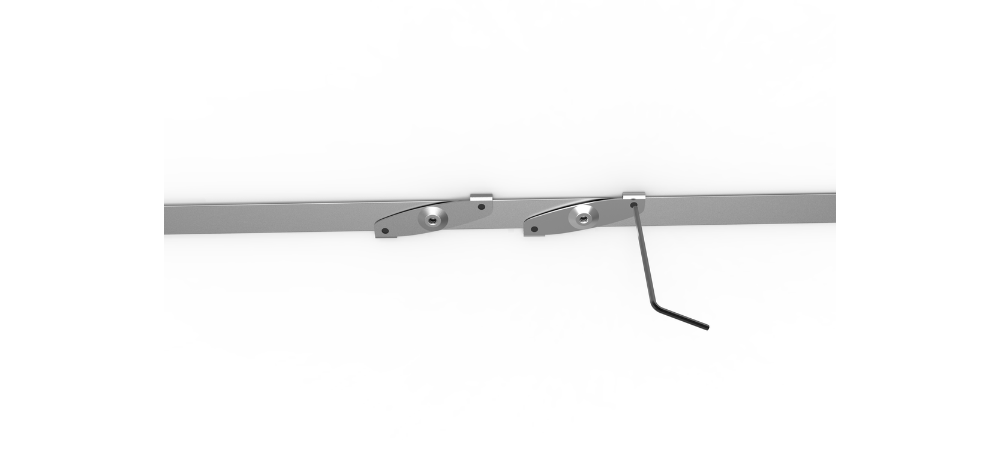
2. Tバーの固定ネジを**L型六角レンチ**で緩めます。Tバーの中央ネジ穴をTレイルにマークした位置に合わせ、**L型六角レンチ**を使用してTバーの固定ネジを締めます。
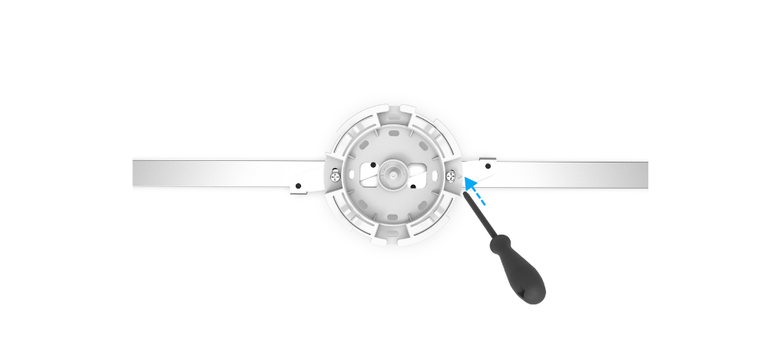
3. 同梱の**Tレイル取り付けネジ**を使用して、**ブラケット**をTバーに取り付けます。
4. **アクセスポイント本体**を**ブラケット**に取り付けるには、ユニットを時計回りに約 45 度回転させて固定します。
---
# Agent Instructions
This documentation is published with GitBook. GitBook is the documentation platform designed so that both humans and AI agents can read, navigate, and reason over technical content effectively. Learn more at gitbook.com.
## Querying This Documentation
If you need additional information that is not directly available in this page, you can query the documentation by asking a question.
Perform an HTTP GET request on the following URL with the `ask` and `goal` query parameters:
```
GET https://docs.lan.kokomocloud.com/quick-start-guide/hardware-installation/ap-installation.md?ask=&goal=
```
`ask` is the immediate question: it should be specific, self-contained, and written in natural language.
`goal` is what the user is ultimately trying to achieve, the reason they need the answer. Sharing it helps GitBook give you a better, more relevant answer. A goal is most helpful when it describes the outcome the user wants rather than restating the question. For example, with `ask=how do I create an API token`, a goal like `automate deployments from our CI pipeline` lets GitBook tailor the answer to that use case.
The response will contain a direct answer to the question and relevant excerpts and sources from the documentation.
Use this mechanism when the answer is not explicitly present in the current page, you need clarification or additional context, or you want to retrieve related documentation sections.