> For the complete documentation index, see [llms.txt](https://docs.lan.kokomocloud.com/llms.txt). Markdown versions of documentation pages are available by appending `.md` to page URLs; this page is available as [Markdown](https://docs.lan.kokomocloud.com/quick-start-guide/gateway/kokomo-g710fw-p.md).

# KOKOMO-G710FW-P

## 各部名称と機能 <a href="#g710fw-p-function" id="g710fw-p-function"></a>

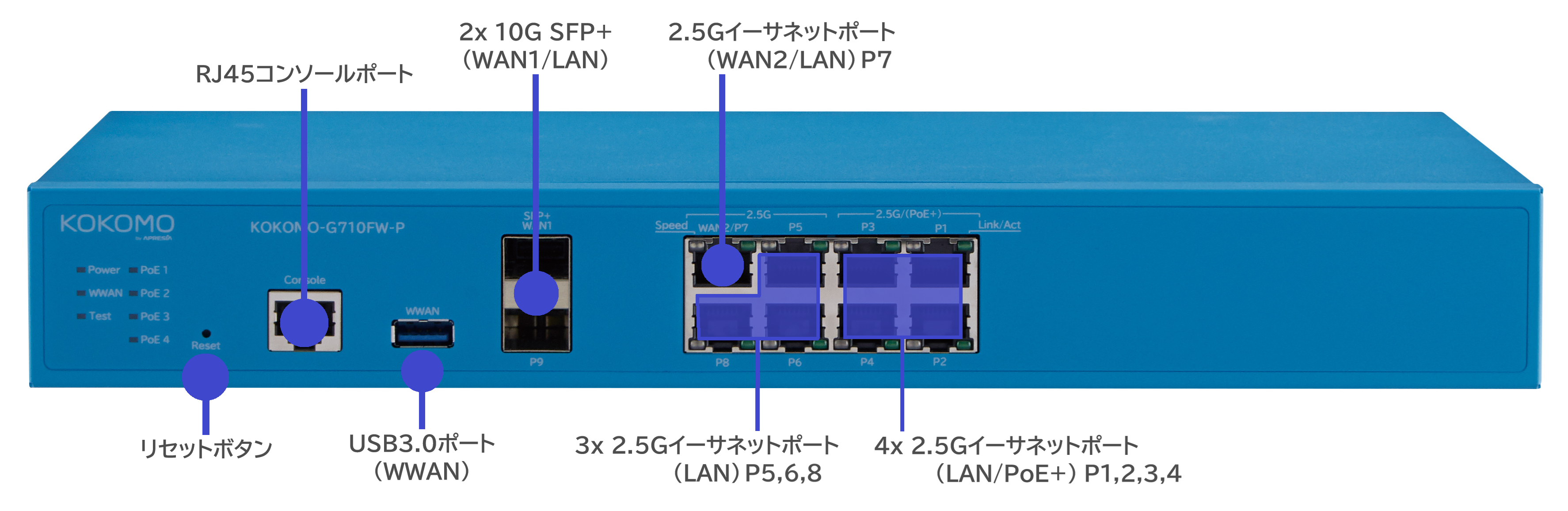
KOKOMO-G710FW-Pの本体の各部の名称を機能を説明します。

<figure><img src="https://content.gitbook.com/content/2ZXxFyDKVrqsM7xn9rTM/blobs/Oeg62ThnGsnuw7yQbOGc/image.png" alt=""><figcaption></figcaption></figure>

{% hint style="info" %}

* 工場出荷時のデフォルトにリセットするには、リセットボタンを **10秒以上** 押し続けてください。Power/WWAN/Test/PoE LEDが点滅し、デバイスは工場出荷時のデフォル ト設定にリセットされます。
  {% endhint %}

{% hint style="warning" %}
コンソールポート、およびUSB3.0ポート(WWAN)は未サポートです。
{% endhint %}

{% hint style="warning" %}
SFP+ポートは10G SFP+トランシーバモジュールのみをサポートし、SFPモジュールはサポートしていません。
{% endhint %}

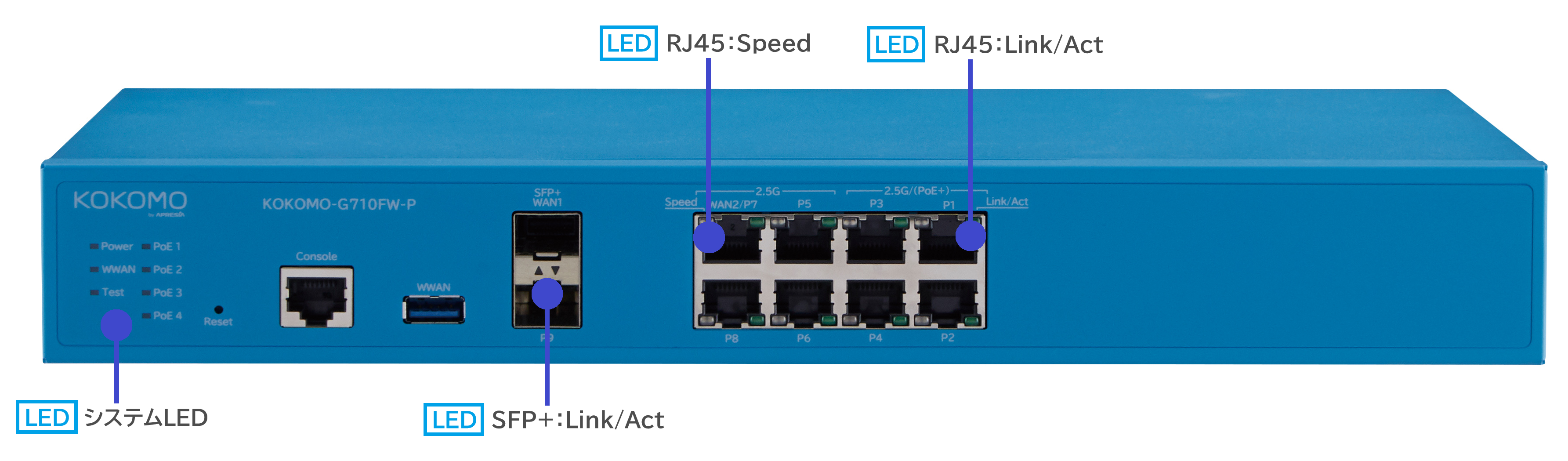
## フロントパネル - システム＆ポートLED <a href="#g710fw-p-led" id="g710fw-p-led"></a>

<figure><img src="https://content.gitbook.com/content/2ZXxFyDKVrqsM7xn9rTM/blobs/MP1I08CK2vTx9P0Hwlyf/image.png" alt=""><figcaption></figcaption></figure>

<table data-full-width="false" data-search="false"><thead><tr><th width="116" valign="top">LED箇所</th><th width="144" valign="top">LEDインジケータ</th><th width="95" valign="top">LED色</th><th width="109" valign="top">LED動作</th><th valign="top">ステータス</th></tr></thead><tbody><tr><td valign="top">システム</td><td valign="top">Power</td><td valign="top">緑　</td><td valign="top">点滅</td><td valign="top">KOKOMO Cloud接続中<br>0.5秒On→0.5秒Off→繰り返し</td></tr><tr><td valign="top"></td><td valign="top"></td><td valign="top"></td><td valign="top">点灯</td><td valign="top">KOKOMO Cloud接続済み</td></tr><tr><td valign="top"></td><td valign="top"></td><td valign="top">橙</td><td valign="top">点滅</td><td valign="top">OS起動<br>0.5秒On→0.5秒Off→繰り返し</td></tr><tr><td valign="top"></td><td valign="top"></td><td valign="top"></td><td valign="top">点灯</td><td valign="top">BIOS起動中</td></tr><tr><td valign="top"></td><td valign="top"></td><td valign="top">緑／橙</td><td valign="top">点滅</td><td valign="top">ファームウェア更新中<br>1秒緑ON→1秒橙ON→繰り返し</td></tr><tr><td valign="top"></td><td valign="top"></td><td valign="top">オフ</td><td valign="top">消灯</td><td valign="top">電源Off</td></tr><tr><td valign="top"></td><td valign="top">WWAN</td><td valign="top">緑</td><td valign="top">点灯</td><td valign="top">良好な信号（>50%）</td></tr><tr><td valign="top">　</td><td valign="top"></td><td valign="top">橙</td><td valign="top">点灯</td><td valign="top">微弱な信号（&#x3C;50%）</td></tr><tr><td valign="top"></td><td valign="top"></td><td valign="top">オフ</td><td valign="top">消灯</td><td valign="top">WWLAN接続なし</td></tr><tr><td valign="top">　</td><td valign="top">Test</td><td valign="top">青</td><td valign="top">点灯</td><td valign="top">フェイルセーフモードもしくはデバッグコマンドモード</td></tr><tr><td valign="top">　</td><td valign="top">　</td><td valign="top">オフ</td><td valign="top">消灯</td><td valign="top">両モードではない</td></tr><tr><td valign="top">　</td><td valign="top">PoE（P1-P4）</td><td valign="top">緑</td><td valign="top">点灯</td><td valign="top">PoE給電中</td></tr><tr><td valign="top"></td><td valign="top"></td><td valign="top">オフ</td><td valign="top">消灯</td><td valign="top">PDデバイス接続なし</td></tr><tr><td valign="top">RJ45ポート</td><td valign="top">左（Speed）</td><td valign="top">緑</td><td valign="top">点灯</td><td valign="top">2.5Gbps</td></tr><tr><td valign="top">　</td><td valign="top">　</td><td valign="top">橙</td><td valign="top">点灯</td><td valign="top">1G/100/10Mbps</td></tr><tr><td valign="top">　</td><td valign="top">　</td><td valign="top">オフ</td><td valign="top">消灯</td><td valign="top">リンクなし</td></tr><tr><td valign="top">　</td><td valign="top">右（Link/Act）</td><td valign="top">緑</td><td valign="top">点灯</td><td valign="top">リンク確立済み</td></tr><tr><td valign="top">　</td><td valign="top">　</td><td valign="top"></td><td valign="top">点滅</td><td valign="top">データ送受信中</td></tr><tr><td valign="top"></td><td valign="top"></td><td valign="top">オフ</td><td valign="top">消灯</td><td valign="top">リンクなし</td></tr><tr><td valign="top">SFP+ポート</td><td valign="top">Link/Act</td><td valign="top">緑</td><td valign="top">点灯</td><td valign="top">リンク確立済み</td></tr><tr><td valign="top">　</td><td valign="top">　</td><td valign="top">　</td><td valign="top">点滅</td><td valign="top">データ送受信中</td></tr><tr><td valign="top">　</td><td valign="top"></td><td valign="top">オフ</td><td valign="top">消灯</td><td valign="top">リンクなし</td></tr></tbody></table>


---

# Agent Instructions
This documentation is published with GitBook. GitBook is the documentation platform designed so that both humans and AI agents can read, navigate, and reason over technical content effectively. Learn more at gitbook.com.

## Querying This Documentation
If you need additional information that is not directly available in this page, you can query the documentation by asking a question.

Perform an HTTP GET request on the following URL with the `ask` and `goal` query parameters:

```
GET https://docs.lan.kokomocloud.com/quick-start-guide/gateway/kokomo-g710fw-p.md?ask=<question>&goal=<user_goal>
```

`ask` is the immediate question: it should be specific, self-contained, and written in natural language.
`goal` is what the user is ultimately trying to achieve, the reason they need the answer. Sharing it helps GitBook give you a better, more relevant answer. A goal is most helpful when it describes the outcome the user wants rather than restating the question. For example, with `ask=how do I create an API token`, a goal like `automate deployments from our CI pipeline` lets GitBook tailor the answer to that use case.

The response will contain a direct answer to the question and relevant excerpts and sources from the documentation.

Use this mechanism when the answer is not explicitly present in the current page, you need clarification or additional context, or you want to retrieve related documentation sections.
