# 役割と権限

## 組織権限の種類 <a href="#organization-permission-types" id="organization-permission-types"></a>

**管理者**：すべてのネットワークと組織全体設定に対して完全な管理アクセス権を持ちます。利用可能な中で最も高いレベルのアクセス権です。

**閲覧者**：ネットワークと組織全体設定のほとんどの側面にアクセスできますが、変更はできません。

**―（権限なし）**：ネットワークの権限を「フロントデスク（受付）」にする場合に使用します。組織に関連する設定へのアクセスおよび変更ができません（具体的には「インベントリとライセンス」タブへのアクセス、チームメンバーの削除などができません）

{% hint style="info" %}
組織権限「管理者」を選択すると、自動的にネットワーク権限は「管理者」となります。
{% endhint %}

{% hint style="danger" %}
組織権限なし「－」は未サポートです。選択しないでください。
{% endhint %}

## ネットワーク権限の種類 <a href="#network-permission-types" id="network-permission-types"></a>

**管理者**：ネットワークのすべての側面にアクセスし、変更を加えることができます。

**閲覧者**：設定セクションを含むネットワークのほとんどの側面にアクセスできますが、変更はできません。

**フロントデスク（受付）**：ゲストパスの生成・管理を行うフロントデスクポータルにアクセスできます。ネットワーク権限に「閲覧者」または「フロントデスク」を選択したい場合、組織権限を「閲覧者」または「なし」に変更すると、そのオプションがネットワークに対して表示されるようになります。

{% hint style="danger" %}
「フロントデスク（受付）」権限は未サポートです。選択しないでください。
{% endhint %}

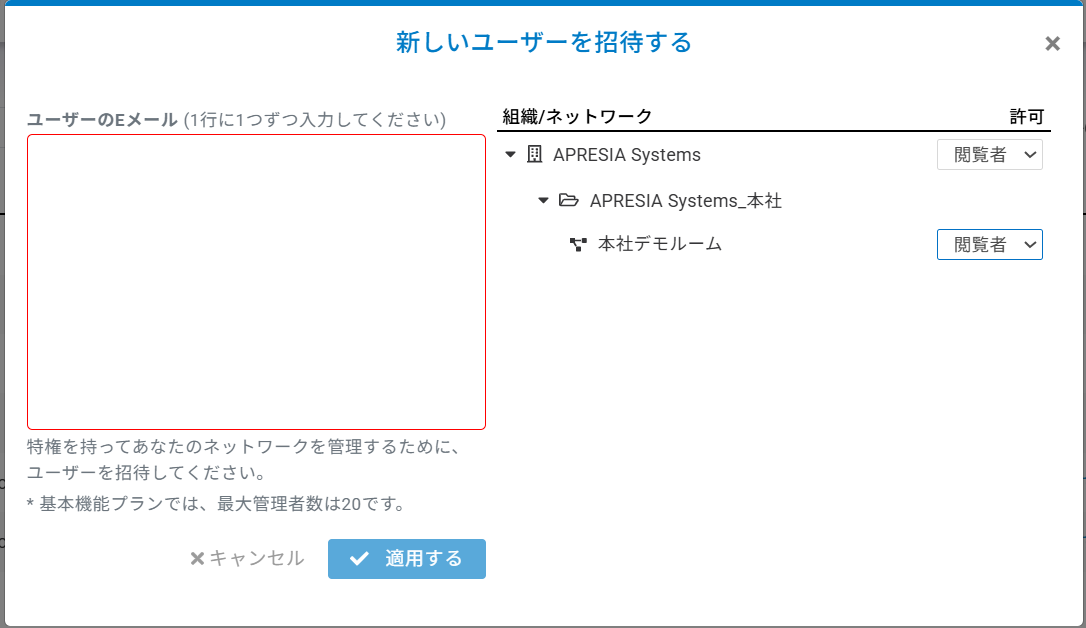
組織権限を「管理者」にすると、ネットワーク権限は「管理者」のみ選択できます。\
組織権限を「閲覧者」に変更すると、ネットワーク権限を「管理者」または「閲覧者」に変更できます。\
組織権限を「なし」に変更すると、ネットワーク権限を「フロントデスク（受付）」に変更できます。

<figure><img src="/files/qOKIeuRZRQSNBYC1P6rw" alt="" width="563"><figcaption></figcaption></figure>

{% hint style="info" %}
組織権限「管理者」を選択すると、自動的にネットワーク権限は「管理者」となります。
{% endhint %}

{% hint style="danger" %}
組織権限なし「－」は未サポートです。選択しないでください。
{% endhint %}

## 権限ごとの操作可否 <a href="#operability" id="operability"></a>

以下の表は、チームメンバーに付与された組織権限とネットワーク権限の組み合わせごとに、実行可能な操作可否について示しています。

* **パターンＡ**\
  　　組織：<mark style="color:$primary;">管理者</mark>  \
  　　ネットワーク：<mark style="color:$primary;">管理者</mark>
* **パターンＢ**\
  　　組織：<mark style="color:$warning;">閲覧者</mark>\
  　　ネットワーク：<mark style="color:$primary;">管理者</mark>
* **パターンＣ**\
  　　組織：<mark style="color:$warning;">閲覧者</mark>\
  　　ネットワーク：<mark style="color:$warning;">閲覧者</mark>

<table data-full-width="false"><thead><tr><th valign="top">操作</th><th width="114" align="center" valign="top">パターンＡ</th><th width="115" align="center" valign="top">パターンＢ</th><th width="115" align="center" valign="top">パターンＣ</th><th valign="top">備考</th></tr></thead><tbody><tr><td valign="top">「インベントリとライセンス」の閲覧、二要素認証・証明書・露出分析の閲覧</td><td align="center" valign="top">〇</td><td align="center" valign="top">〇</td><td align="center" valign="top">〇</td><td valign="top"></td></tr><tr><td valign="top">デバイスの組織変更・ネットワークへの割り当て/削除・デバイス登録/解除</td><td align="center" valign="top">〇</td><td align="center" valign="top">〇</td><td align="center" valign="top">✕</td><td valign="top">組織の権限が「閲覧者」の場合、「管理者」の権限が付与されているネットワークに割り当てられているデバイスのみ操作可能</td></tr><tr><td valign="top">二要素認証・証明書・露出分析の設定変更</td><td align="center" valign="top">〇</td><td align="center" valign="top">✕</td><td align="center" valign="top">✕</td><td valign="top"></td></tr><tr><td valign="top">「フロアプラン」での設定変更</td><td align="center" valign="top">〇</td><td align="center" valign="top">〇</td><td align="center" valign="top">✕</td><td valign="top">障害物の描画、仮想APの設置などの操作</td></tr><tr><td valign="top">チームメンバーの招待</td><td align="center" valign="top">〇</td><td align="center" valign="top">〇</td><td align="center" valign="top">✕</td><td valign="top">組織の権限が「閲覧者」の場合、「管理者」の権限が付与されているネットワークにのみ招待可能</td></tr><tr><td valign="top">チームメンバーの削除</td><td align="center" valign="top">〇</td><td align="center" valign="top">✕</td><td align="center" valign="top">✕</td><td valign="top"></td></tr><tr><td valign="top">チームメンバーの権限変更</td><td align="center" valign="top">〇</td><td align="center" valign="top">✕</td><td align="center" valign="top">✕</td><td valign="top"></td></tr></tbody></table>


---

# Agent Instructions: Querying This Documentation

If you need additional information that is not directly available in this page, you can query the documentation dynamically by asking a question.

Perform an HTTP GET request on the current page URL with the `ask` query parameter:

```
GET https://docs.lan.kokomocloud.com/managing-team-members/roles-and-permissions.md?ask=<question>
```

The question should be specific, self-contained, and written in natural language.
The response will contain a direct answer to the question and relevant excerpts and sources from the documentation.

Use this mechanism when the answer is not explicitly present in the current page, you need clarification or additional context, or you want to retrieve related documentation sections.
