> For the complete documentation index, see [llms.txt](https://docs.lan.kokomocloud.com/llms.txt). Markdown versions of documentation pages are available by appending `.md` to page URLs; this page is available as [Markdown](https://docs.lan.kokomocloud.com/managing-devices/managing-switches/log.md).
# ログ
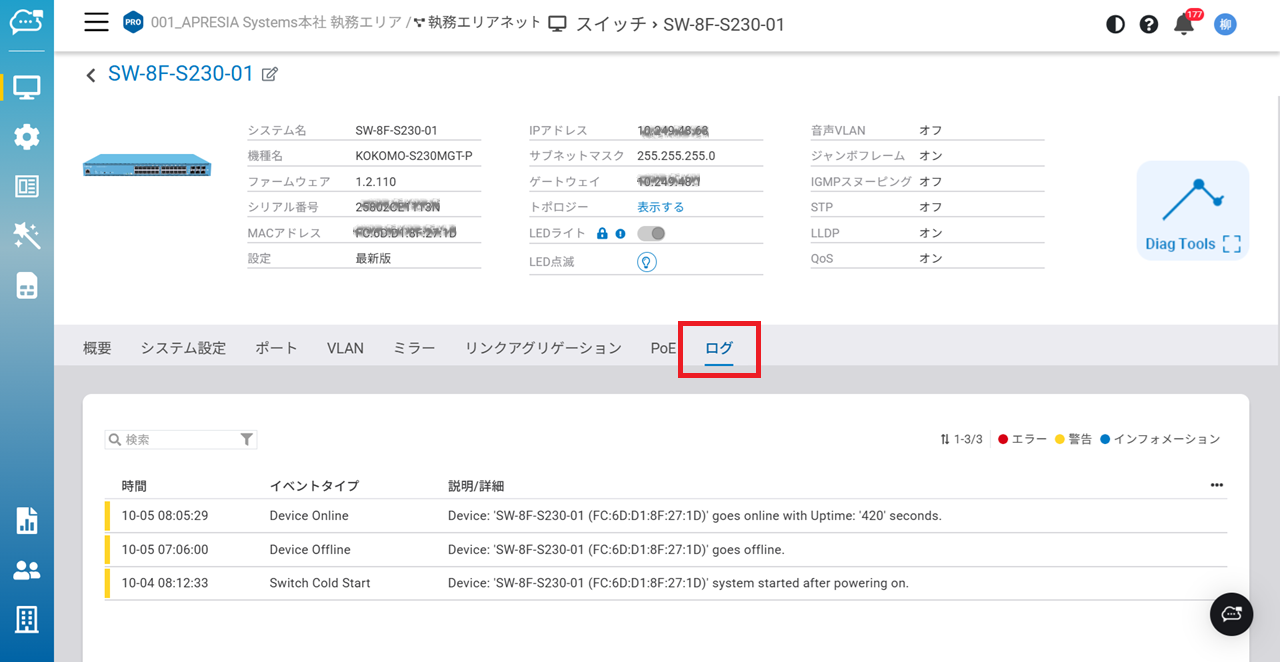
KOKOMO Cloudのログには、複数のロギングサブシステムがあり、それぞれデータ保持期間やエクスポートのオプションが異なります。デバイスイベント、システム設定、分析などのデータセットは、それぞれ全く異なる目的(ビジネスインテリジェンス、運用、リスク管理など)で使用されており、ネイティブのロギング機能に反映されています。「**ログ**」タブのページでは、現在のスイッチのすべてのデバイスログがリスト表示されます。ネットワーク全体のイベントを追跡したい場合は、「**デバイスイベント**」を参照してください。
{% hint style="warning" %}
ログの保存期間は最大30日間となります。それ以前の日付を設定しても閲覧することはできません。
{% endhint %}
### フィルタリング
デバイスログはスイッチ上のイベントを時系列で詳細に記録しますが、通常、すべてのイベントを閲覧する必要はありません。必要に応じて、以下のオプションでイベントログを絞り込めます。
#### 日時によるフィルタリング
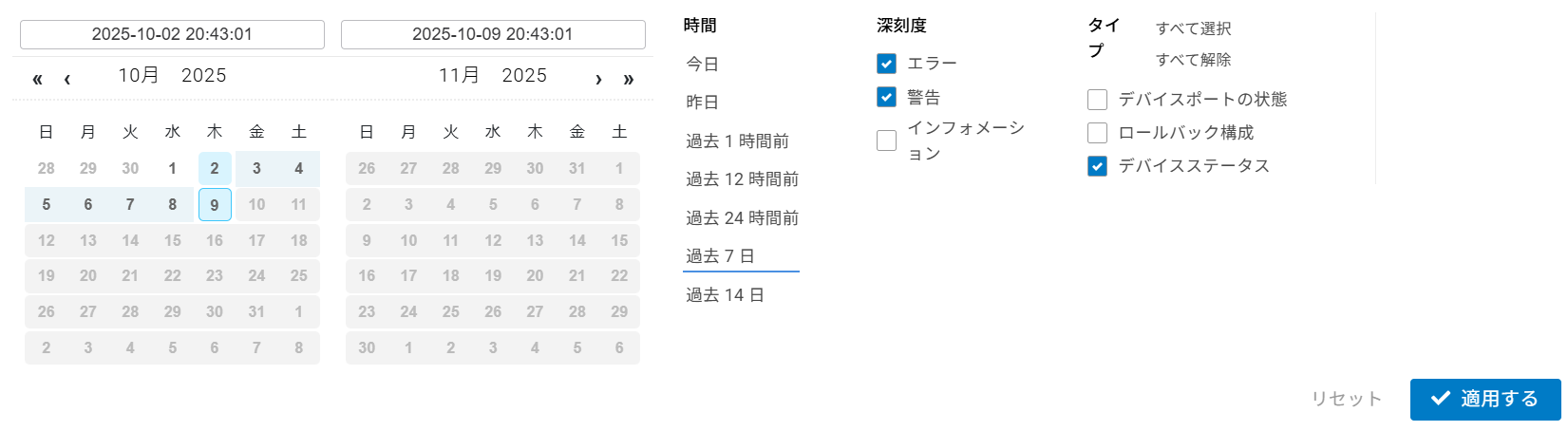
イベントログには、デフォルトで最新のイベントから順に、デバイスのすべてのイベントが表示されます。日時のフィルタは、指定された時間と同じか、それ以前のイベントのみを表示する際に役立ちます。
{% hint style="info" %}
14日前のログよりさらに前のログも30日以内であれば閲覧可能です。カレンダーの日時フィルタを使用して必要な期間を設定してください。
{% endhint %}
#### 重大度によるフィルタリング
イベントログは重大度に応じて、以下のように分類されます:
* エラー
* 警告
* インフォメーション
また、特定の重大度のログだけを表示するようにフィルタを設定することも可能です。
#### イベントタイプによるフィルタリング
KOKOMO-Sスイッチは、以下のイベントタイプを報告します:
* デバイスポートの状態
* ロールバック構成
* デバイスステータス
フィルタは、上記のすべてのタイプのイベントにも対応しています。
---
# Agent Instructions
This documentation is published with GitBook. GitBook is the documentation platform designed so that both humans and AI agents can read, navigate, and reason over technical content effectively. Learn more at gitbook.com.
## Querying This Documentation
If you need additional information that is not directly available in this page, you can query the documentation dynamically by asking a question.
Perform an HTTP GET request on the current page URL with the `ask` query parameter, and the optional `goal` query parameter:
```
GET https://docs.lan.kokomocloud.com/managing-devices/managing-switches/log.md?ask=&goal=
```
`ask` is the immediate question: it should be specific, self-contained, and written in natural language.
`goal` is optional and describes the broader end goal you are ultimately trying to accomplish on behalf of the user. GitBook uses it to tailor the answer towards what is most useful for that goal.
The response will contain a direct answer to the question and relevant excerpts and sources from the documentation.
Use this mechanism when the answer is not explicitly present in the current page, you need clarification or additional context, or you want to retrieve related documentation sections.