> For the complete documentation index, see [llms.txt](https://docs.lan.kokomocloud.com/llms.txt). Markdown versions of documentation pages are available by appending `.md` to page URLs; this page is available as [Markdown](https://docs.lan.kokomocloud.com/configuring-networks/general-settings/gateway.md).
# ゲートウェイ
## LLDP
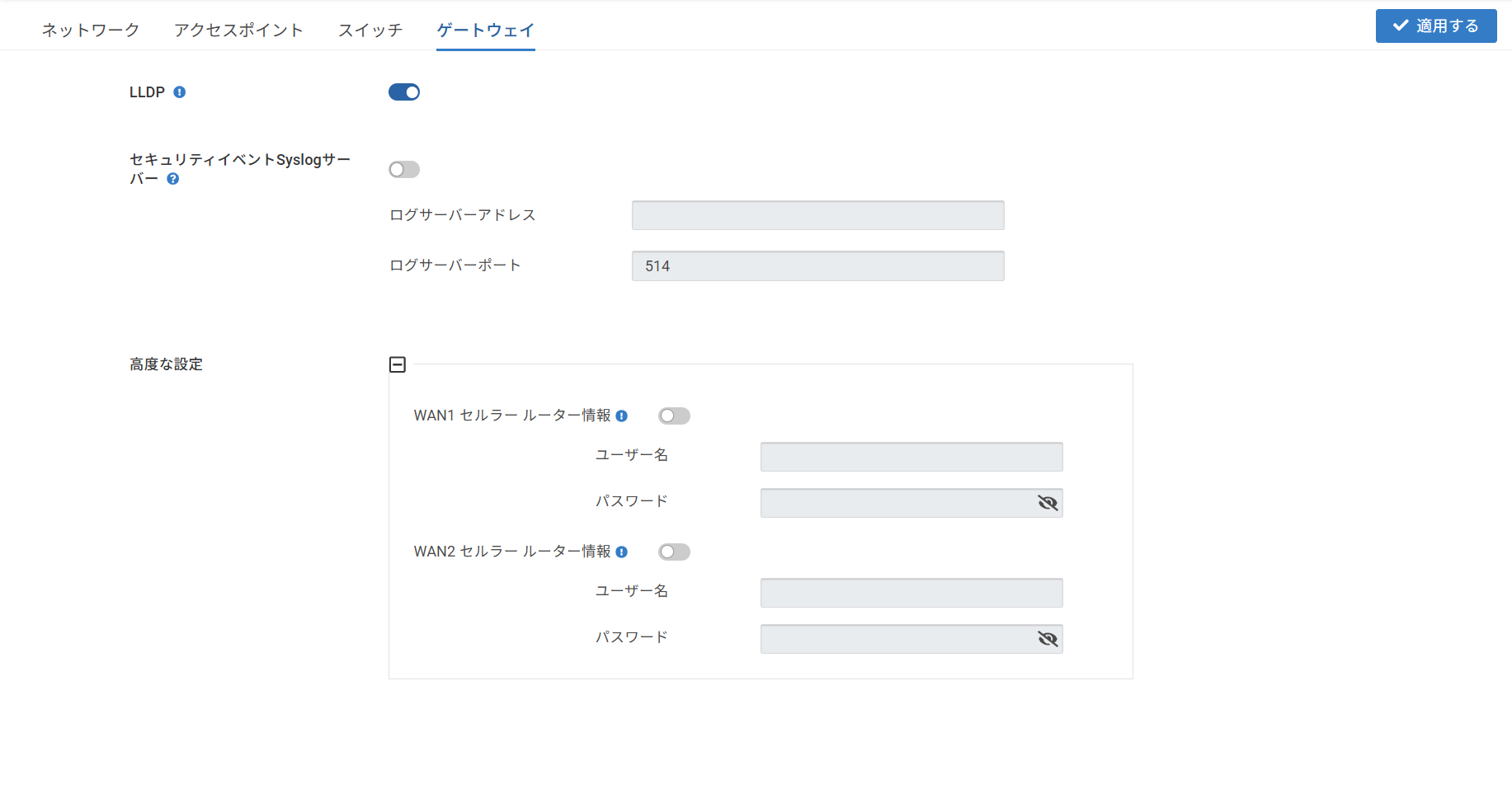
リンク層検出プロトコル(LLDP)は、ネットワーク機器の検出とトポロジーマッピングに使用される、ベンダーに依存しないレイヤ2プロトコルです。これにより、機器は直接接続されている近隣機器に関する情報を通知したり、受信したりすることができます。
デフォルトでは、ゲートウェイでLLDPが有効になっています。しかし、特にデバイス数が多い環境では、CPU使用率が高くなる可能性があります。パフォーマンスを最適化するために、ユーザーは必要に応じてLLDPを有効または無効にすることができます。
## セキュリティイベントSyslogサーバー
セキュリティイベントSyslogサーバーにはIPSログが含まれています。
* 有効にすると、セキュリティイベントを指定のSyslogサーバーへ転送します。
* **ログサーバーアドレス**:syslogサーバーのIPアドレスまたはホスト名を指定します。
* **ログサーバーポート**:syslogサーバーのポートを指定します。デフォルトのポートは514です。
---
# Agent Instructions
This documentation is published with GitBook. GitBook is the documentation platform designed so that both humans and AI agents can read, navigate, and reason over technical content effectively. Learn more at gitbook.com.
## Querying This Documentation
If you need additional information that is not directly available in this page, you can query the documentation by asking a question.
Perform an HTTP GET request on the following URL with the `ask` and `goal` query parameters:
```
GET https://docs.lan.kokomocloud.com/configuring-networks/general-settings/gateway.md?ask=&goal=
```
`ask` is the immediate question: it should be specific, self-contained, and written in natural language.
`goal` is what the user is ultimately trying to achieve, the reason they need the answer. Sharing it helps GitBook give you a better, more relevant answer. A goal is most helpful when it describes the outcome the user wants rather than restating the question. For example, with `ask=how do I create an API token`, a goal like `automate deployments from our CI pipeline` lets GitBook tailor the answer to that use case.
The response will contain a direct answer to the question and relevant excerpts and sources from the documentation.
Use this mechanism when the answer is not explicitly present in the current page, you need clarification or additional context, or you want to retrieve related documentation sections.