> For the complete documentation index, see [llms.txt](https://docs.lan.kokomocloud.com/llms.txt). Markdown versions of documentation pages are available by appending `.md` to page URLs; this page is available as [Markdown](https://docs.lan.kokomocloud.com/configuring-networks/configuring-gateway/configuring-ids-ips.md).

# セキュリティサービスの設定

## 概要 <a href="#overview" id="overview"></a>

KOKOMOゲートウェイは、ネットワークを悪意のある、または疑わしい通信から監視・保護するための、侵入検知システム（IDS）および侵入防止システム（IPS）機能を提供します。

IDS/IPS は、Suricata 監視エンジンおよび Emerging Threats（ET）Open ルールセットを使用してネットワークトラフィックを解析します。ET Open ルールセットには、攻撃の悪用、マルウェア通信、ポリシー違反、異常なトラフィック動作を検知するための多数のセキュリティシグネチャが含まれています。

管理者は、必要なセキュリティ強制レベルに応じて、検知モード（IDS）または防御モード（IPS）のいずれかで運用できます。

<table><thead><tr><th width="207" valign="top">項目</th><th valign="top">説明</th></tr></thead><tbody><tr><td valign="top">IDS（侵入検知システム）</td><td valign="top">トラフィックを監視し、疑わしい動作をアラートとして通知します</td></tr><tr><td valign="top">IPS（侵入防止システム）</td><td valign="top">悪意のあるトラフィックをリアルタイムで検知し、遮断します</td></tr><tr><td valign="top">検知エンジン</td><td valign="top">Suricata</td></tr><tr><td valign="top">ルールセット</td><td valign="top">Emerging Threats (ET) Open</td></tr></tbody></table>

## 主な利点 <a href="#key-benefits" id="key-benefits"></a>

* 脅威の可視化：  \
  プロトコル、エンドポイント、ポート、シグネチャ ID（SID）、重大度を含む詳細なセキュリティイベント情報を提供します。
* 能動的な保護：  \
  既知の攻撃手法、マルウェアの C\&C 通信、その他の悪意のある活動を遮断します。
* 検知範囲：  \
  Emerging Threats（ET）Open ルールセットを使用し、広範な脅威検知を提供します。
* 運用の柔軟性：  \
  検知のみの監視から開始し、その後、能動的な保護を有効化できます。
* セキュリティログとフォレンジック：  \
  セキュリティイベントは、監査および調査のためにログ記録、エクスポート、または外部ログシステムへの転送が可能です。

{% hint style="info" %}
ゲートウェイをパススルーモードに切り替えると、IDS/IPS の設定は自動的に無効になります。
{% endhint %}

## 設定方法 <a href="#ow-to-configure" id="ow-to-configure"></a>

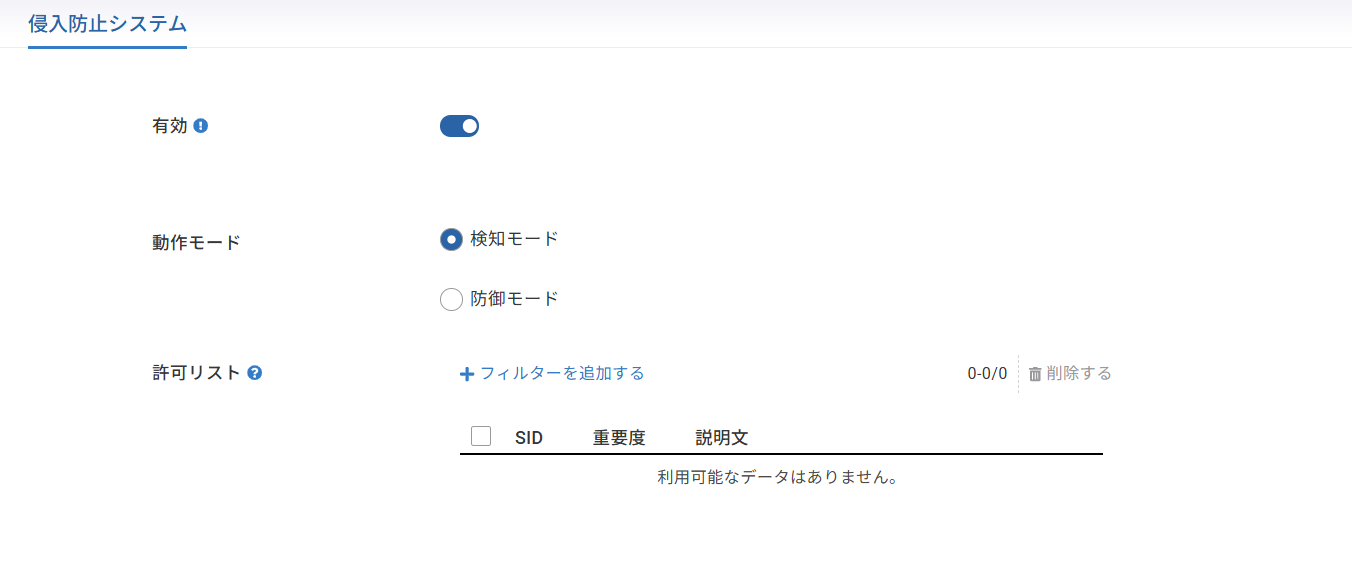
1. 「**設定**」＞「**ゲートウェイ**」＞「**セキュリティサービス**」＞「**侵入防止システム**」に移動します。
2. 必要な動作モード（「検出」もしくは「予防」）を選択します。
3. 「**適用する**」をクリックして設定を保存します。

<figure><img src="https://content.gitbook.com/content/UGo1fJsX7itL1XTQMLx9/blobs/7oMo3pB6TX7gE1iflZFE/image.png" alt=""><figcaption></figcaption></figure>

### IDS/IPS の動作モード <a href="#ids-ips-operating-modes" id="ids-ips-operating-modes"></a>

**〇 検知モード (IDS)**

検知モードでは、トラフィックを解析し、パケットを遮断せずにアラートを生成します。

特性：

* アラートのみ
* トラフィック遮断なし
* セキュリティイベントをログに記録

推奨用途：

* 初期導入時
* トラフィック監視およびベースライン分析
* 遮断を有効化する前の誤検知低減

**〇 防御モード (IPS)**

防御モードでは、IPS シグネチャにより悪意のあるものとして識別されたトラフィックを積極的に遮断します。

特性：

* 脅威を検知して遮断
* セキュリティイベントをログに記録
* リアルタイム保護を提供

推奨用途：

* 本番環境
* 能動的な脅威防御が必要なネットワーク

### **Emerging Threats (ET) Open ルールセット** <a href="#emerging-threats-open-ruleset" id="emerging-threats-open-ruleset"></a>

KOKOMOゲートウェイは、IPS のシグネチャデータベースとして Emerging Threats（ET）Open ルールセットを使用します。このルールセットには、以下を検知するための多数のシグネチャが含まれています。

* マルウェア通信
* 攻撃の試行
* ボットネットのC＆C（command and control）通信
* Webアプリケーション攻撃
* ネットワークスキャン活動
* ポリシー違反
* 疑わしい、または異常なトラフィック動作

IDS/IPS を有効にすると、該当する ET Open ルールが自動的に適用されます。

### 重要度（深刻度）レベル <a href="#severity-levels" id="severity-levels"></a>

各 IPS/IDS シグネチャには、検知された活動の潜在的リスクを示す重大度レベルがあります。

<table><thead><tr><th width="189" valign="top">重大度（深刻度）</th><th valign="top">説明</th></tr></thead><tbody><tr><td valign="top">Critical（重要な）</td><td valign="top">アクティブな攻撃の悪用やマルウェア通信など、極めて危険な脅威を示します</td></tr><tr><td valign="top">Major（主要）</td><td valign="top">攻撃の可能性を示す、高リスクの疑わしい活動を示します</td></tr><tr><td valign="top">Minor（軽微）</td><td valign="top">低リスクの異常、または通常とは異なるネットワーク動作を示します</td></tr><tr><td valign="top">Informational（情報）</td><td valign="top">セキュリティ分析のための補足情報を提供します</td></tr><tr><td valign="top">Unknown（不明）</td><td valign="top">重大度を判定できない、または定義できないことを示します</td></tr></tbody></table>

### Informational （情報）重大度のオプション <a href="#informational-severity-option" id="informational-severity-option"></a>

防御モードが有効な場合、「情報の重大度を含める」をチェックすることでInformational イベントも遮断対象とすることができます。

<table><thead><tr><th width="189">設定</th><th>動作</th></tr></thead><tbody><tr><td>有効（チェックあり）</td><td>Informational （情報）イベントを遮断し、ログに記録します</td></tr><tr><td>無効（チェックなし）</td><td>Informational（情報） イベントはログのみに記録します</td></tr></tbody></table>

Informational（情報）イベントの例：

* Tor ネットワークへのアクセス
* Dynamic DNS 活動
* 通常とは異なる User-Agent 文字列
* ネットワーク診断トラフィック

これらのイベントは必ずしも悪意があるとは限らないため、遮断すると誤検知が増える可能性があります。

<figure><img src="https://content.gitbook.com/content/UGo1fJsX7itL1XTQMLx9/blobs/xHrwURWjSA6MkI5OeHC3/image.png" alt=""><figcaption></figcaption></figure>

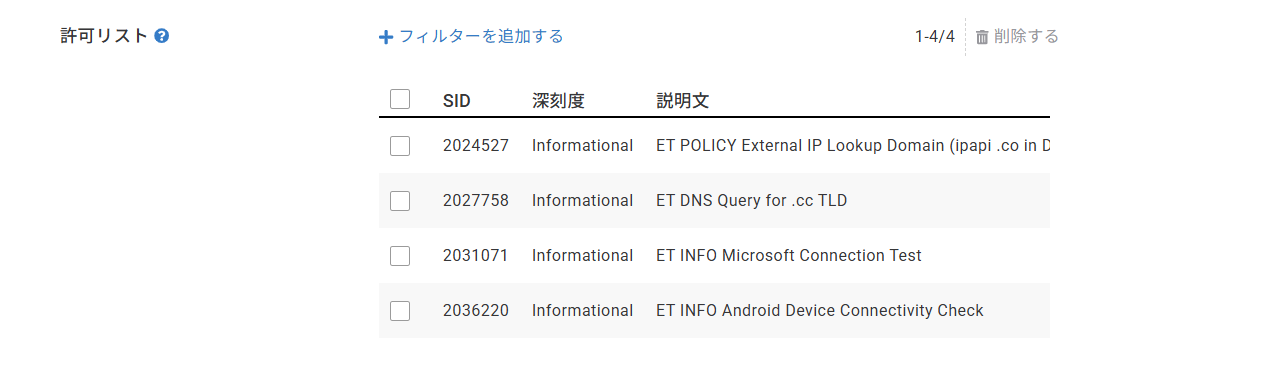
### **許可リスト** <a href="#allowed-list" id="allowed-list"></a>

許可リストを使用すると、特定の IPS シグネチャを検知または遮断の対象から除外できます。

許可リストに追加されたルールは、シグネチャ ID（SID）で識別されます。ルールを追加すると、以下の動作になります。

* ゲートウェイは該当シグネチャを無視します
* 今後、その SID に一致するイベントはアラートも遮断も行われません

<figure><img src="https://content.gitbook.com/content/UGo1fJsX7itL1XTQMLx9/blobs/GO0IBG9Km7tVKOpvPIJH/image.png" alt=""><figcaption></figcaption></figure>

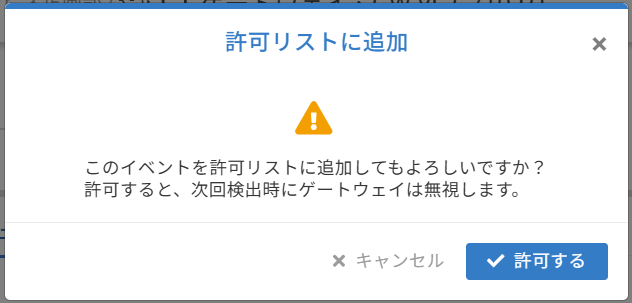
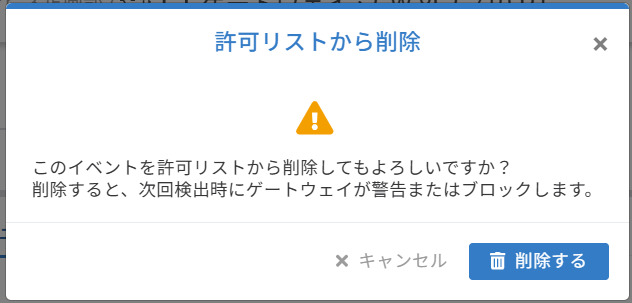
### イベントを許可リストに追加する <a href="#adding-an-event-to-the-allowed-list" id="adding-an-event-to-the-allowed-list"></a>

「**管理**」＞「**ゲートウェイ**」＞「**詳細情報**」＞「**セキュリティイベント**」＞「**侵入防止システム**」に移動します。

手順：

1. セキュリティイベントを検索します。
2. 「**許可リストに追加**」もしくは「**許可リストから削除**」をクリックします。

<figure><img src="https://content.gitbook.com/content/UGo1fJsX7itL1XTQMLx9/blobs/IrglEwzoF5V85kIe9sOx/image.png" alt=""><figcaption></figcaption></figure>

<div align="left"><figure><img src="https://content.gitbook.com/content/UGo1fJsX7itL1XTQMLx9/blobs/MwIIDZVqQv4CU0QIcFuy/image.png" alt="" width="474"><figcaption><p>許可リスト追加時のダイアログ</p></figcaption></figure> <figure><img src="https://content.gitbook.com/content/UGo1fJsX7itL1XTQMLx9/blobs/p3dagARzcH6kqhoJXvN7/image.png" alt="" width="474"><figcaption><p>許可リストから削除時のダイアログ</p></figcaption></figure></div>

### セキュリティイベントの表示 <a href="#viewing-security-events" id="viewing-security-events"></a>

各イベントについて、以下の情報が記録されます。

<table data-search="false"><thead><tr><th width="281" valign="top">項目</th><th valign="top">説明</th></tr></thead><tbody><tr><td valign="top">時間</td><td valign="top">イベントのタイムスタンプ</td></tr><tr><td valign="top">ゲートウェイ</td><td valign="top">Alert または Block</td></tr><tr><td valign="top">プロトコル</td><td valign="top">ネットワークプロトコル</td></tr><tr><td valign="top">送信元IPアドレス</td><td valign="top">送信元 IP アドレス</td></tr><tr><td valign="top">送信元ポート番号</td><td valign="top">送信元ポート</td></tr><tr><td valign="top">送信先IP</td><td valign="top">宛先 IP アドレス</td></tr><tr><td valign="top">宛先ポート</td><td valign="top">宛先ポート</td></tr><tr><td valign="top">SID</td><td valign="top">シグネチャ ID</td></tr><tr><td valign="top">深刻度</td><td valign="top">脅威の重大度</td></tr><tr><td valign="top">説明文</td><td valign="top">IPS ルールの説明</td></tr></tbody></table>

ログエントリが存在する場合、そのパケットはログ記録または遮断のいずれかが行われたことを示します。

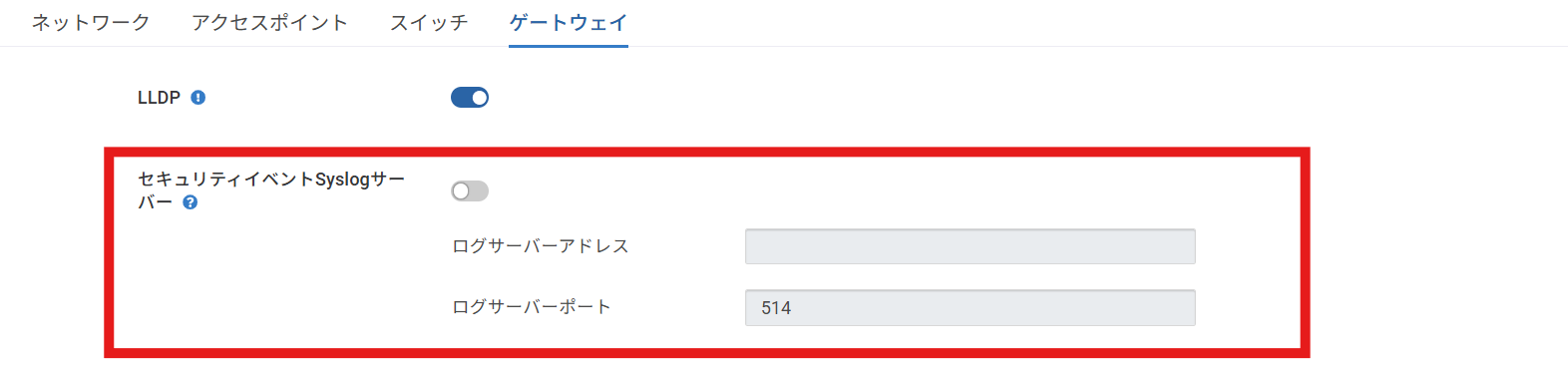
### Syslog 連携 <a href="#syslog-integration" id="syslog-integration"></a>

IPS ログは外部 Syslog サーバーへ転送できます。

「**設定**」＞「**一般設定**」＞「**ゲートウェイ**」＞「**セキュリティイベントSyslogサーバー**」で設定します。

<figure><img src="https://content.gitbook.com/content/UGo1fJsX7itL1XTQMLx9/blobs/jI9hGzeidelJOnrQMZHj/image.png" alt=""><figcaption></figcaption></figure>

* **ステータス：**&#x6709;効／無効
* **ログサーバーアドレス：**&#x53;yslog サーバーの IP アドレス
* **ログサーバーポート：**&#x30C7;フォルト: 514

有効にすると、IPS ログは指定した Syslog サーバーへ転送されます。


---

# Agent Instructions
This documentation is published with GitBook. GitBook is the documentation platform designed so that both humans and AI agents can read, navigate, and reason over technical content effectively. Learn more at gitbook.com.

## Querying This Documentation
If you need additional information that is not directly available in this page, you can query the documentation by asking a question.

Perform an HTTP GET request on the following URL with the `ask` and `goal` query parameters:

```
GET https://docs.lan.kokomocloud.com/configuring-networks/configuring-gateway/configuring-ids-ips.md?ask=<question>&goal=<user_goal>
```

`ask` is the immediate question: it should be specific, self-contained, and written in natural language.
`goal` is what the user is ultimately trying to achieve, the reason they need the answer. Sharing it helps GitBook give you a better, more relevant answer. A goal is most helpful when it describes the outcome the user wants rather than restating the question. For example, with `ask=how do I create an API token`, a goal like `automate deployments from our CI pipeline` lets GitBook tailor the answer to that use case.

The response will contain a direct answer to the question and relevant excerpts and sources from the documentation.

Use this mechanism when the answer is not explicitly present in the current page, you need clarification or additional context, or you want to retrieve related documentation sections.