> For the complete documentation index, see [llms.txt](https://docs.lan.kokomocloud.com/llms.txt). Markdown versions of documentation pages are available by appending `.md` to page URLs; this page is available as [Markdown](https://docs.lan.kokomocloud.com/configuring-networks/configuring-gateway/configuring-high-availability.md).

# 高可用性（HA）の設定

## 概要 <a href="#overview" id="overview"></a>

高可用性（High Availability：HA）は、2 つのゲートウェイがアクティブ/スタンバイアーキテクチャを使用して冗長ペアとして動作することを可能にします。マスターゲートウェイがライブトラフィックを処理し、バックアップゲートウェイは同期された状態で待機し、障害発生時に自動的に切り替わります。

このセクションでは、KOKOMO Cloud インターフェースを使用して HA を設定する方法について説明します。

{% hint style="info" %}
完全な導入要件とトポロジー設計については、以下のリンクを参照してください：

* [**高可用性クイックスタートガイド**](https://docs.lan.kokomocloud.com/configuring-networks/configuring-gateway/configuring-high-availability/quick-start-guide.md)：物理セットアップ、配線、初期プロビジョニング
* [**高可用性概要**](https://docs.lan.kokomocloud.com/configuring-networks/configuring-gateway/configuring-high-availability/ha-overview.md)：アーキテクチャ、サービス継続性、運用動作
* [**高可用性デザインガイド**](https://docs.lan.kokomocloud.com/configuring-networks/configuring-gateway/configuring-high-availability/design-guide.md)：トポロジー、フェイルオーバーロジック、ベストプラクティス
  {% endhint %}

## 準備 <a href="#before-you-begin" id="before-you-begin"></a>

HA を設定する前に、以下の要件を満たしていることを確認してください：

* 同じモデルのゲートウェイが 2 つある
* 両方のデバイスが同じファームウェアバージョンで動作している
* WAN インターフェースが Static IPv4 で設定されている
* デバイスが KOKOMO Cloud に登録されている
* バックアップユニットが利用可能で未割り当てである

## 高可用性（HA）の設定 <a href="#configure-high-availability" id="configure-high-availability"></a>

{% stepper %}
{% step %}

### HA の有効化 <a href="#enable-ha" id="enable-ha"></a>

* 「**設定**」＞「**ゲートウェイ**」＞「**高可用性**」に移動する
* バックアップユニットを選択する
* 「**高可用性**」を有効にする

<div align="left"><figure><img src="https://content.gitbook.com/content/UGo1fJsX7itL1XTQMLx9/blobs/pUUfHZF7KkwTILqXY21R/image.png" alt=""><figcaption></figcaption></figure></div>
{% endstep %}

{% step %}

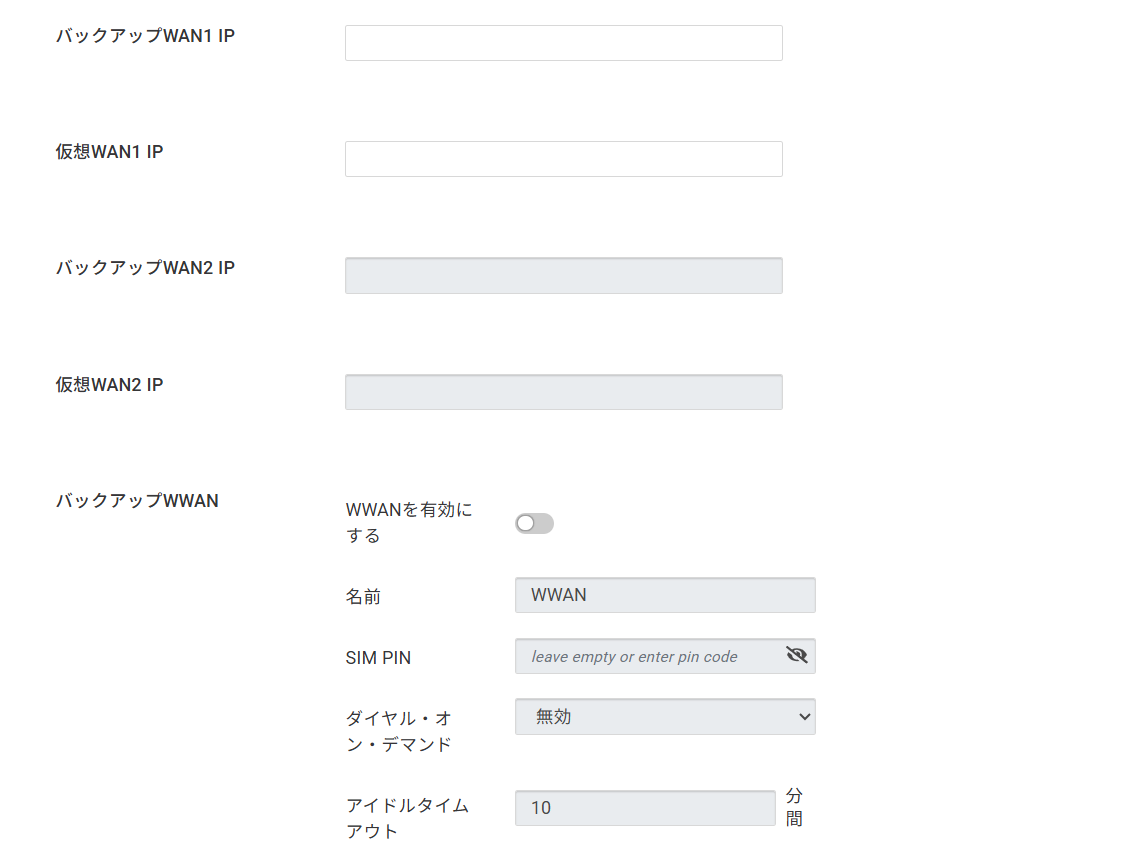
### WAN設定 <a href="#configure-wan-settings" id="configure-wan-settings"></a>

**WAN1**

* **バックアップ WAN1 IP：**&#x30D0;ックアップゲートウェイの WAN IP を入力
* **仮想 WAN1 IP：**&#x5171;有仮想 IP を入力

**WAN2（オプション）**

* **バックアップ WAN2 IP**
* **仮想 WAN2 IP**

仮想 IP は、フェイルオーバー時にアクティブゲートウェイアドレスとして使用されます。
{% endstep %}

{% step %}

### WWAN設定（オプション　※未サポート） <a href="#configure-wwan" id="configure-wwan"></a>

* **WWAN**を有効化する
* 以下を設定する：

  * **名前**
  * **SIM PIN（必要な場合）**
  * **ダイアル・オン・デマンド**
  * **アイドルタイムアウト**

  <div align="left"><figure><img src="https://content.gitbook.com/content/UGo1fJsX7itL1XTQMLx9/blobs/haxiv98dUsfkg9om7eM6/image.png" alt=""><figcaption></figcaption></figure></div>

{% endstep %}

{% step %}

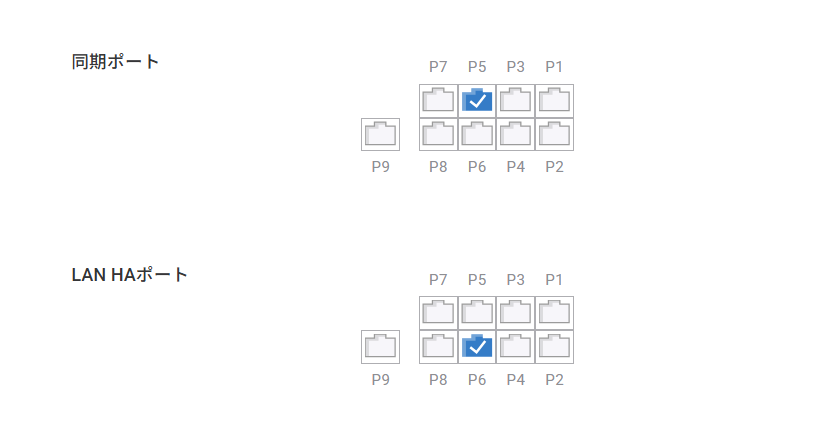
### HA ポートの設定 <a href="#configure-ha-ports" id="configure-ha-ports"></a>

* **同期ポート (P5)：**&#x72B6;態同期に使用
* **LAN HA ポート (P6)：**&#x30CF;ートビート検出に使用

これらのポートは、ゲートウェイモデルに基づいて自動的に割り当てられます。

<div align="left"><figure><img src="https://content.gitbook.com/content/UGo1fJsX7itL1XTQMLx9/blobs/DtDATMmX3NZEQ9DKYl8I/image.png" alt=""><figcaption></figcaption></figure></div>
{% endstep %}

{% step %}

### LAN HAの設定 <a href="#configure-lan-ha" id="configure-lan-ha"></a>

ローカルネットワークで HA を使用する設定：

* **マスター IP：**&#x30D7;ライマリゲートウェイの LAN IP
* **バックアップ IP：**&#x30BB;カンダリゲートウェイの LAN IP

両方の IP アドレスは、同じサブネット内にある必要があります。

<figure><img src="https://content.gitbook.com/content/UGo1fJsX7itL1XTQMLx9/blobs/hQ14qOhp54na4VFCK1JK/image.png" alt=""><figcaption></figcaption></figure>
{% endstep %}

{% step %}

### 設定の適用 <a href="#apply-settings" id="apply-settings"></a>

「**適用する**」をクリックして設定を保存する。
{% endstep %}

{% step %}

### HA 状態の検証 <a href="#verify-ha-status" id="verify-ha-status"></a>

「**管理**」＞「**ゲートウェイ**」に移動し、以下の事項を確認する：

* 1 つのデバイスが マスター（有効）を示す
* 1 つのデバイスが バックアップを示す
  {% endstep %}
  {% endstepper %}

{% hint style="info" %}

* クライアントは仮想IPをデフォルトゲートウェイとして使用する必要があります。
* 同期ポートはゲートウェイ間で直接接続する必要があります。
* HAには同一のハードウェアとファームウェアバージョンが必要です。
* デュアルWANでは、フェイルオーバーモードのみがサポートされています。
* HA 設定は、KOKOMO Cloud 経由で実行する必要があります。
  {% endhint %}


---

# Agent Instructions
This documentation is published with GitBook. GitBook is the documentation platform designed so that both humans and AI agents can read, navigate, and reason over technical content effectively. Learn more at gitbook.com.

## Querying This Documentation
If you need additional information that is not directly available in this page, you can query the documentation by asking a question.

Perform an HTTP GET request on the following URL with the `ask` and `goal` query parameters:

```
GET https://docs.lan.kokomocloud.com/configuring-networks/configuring-gateway/configuring-high-availability.md?ask=<question>&goal=<user_goal>
```

`ask` is the immediate question: it should be specific, self-contained, and written in natural language.
`goal` is what the user is ultimately trying to achieve, the reason they need the answer. Sharing it helps GitBook give you a better, more relevant answer. A goal is most helpful when it describes the outcome the user wants rather than restating the question. For example, with `ask=how do I create an API token`, a goal like `automate deployments from our CI pipeline` lets GitBook tailor the answer to that use case.

The response will contain a direct answer to the question and relevant excerpts and sources from the documentation.

Use this mechanism when the answer is not explicitly present in the current page, you need clarification or additional context, or you want to retrieve related documentation sections.