> For the complete documentation index, see [llms.txt](https://docs.lan.kokomocloud.com/llms.txt). Markdown versions of documentation pages are available by appending `.md` to page URLs; this page is available as [Markdown](https://docs.lan.kokomocloud.com/configuring-networks/configuring-access-points/configuring-ssids/captive-portal/custom-radius.md).
# カスタムRADIUS
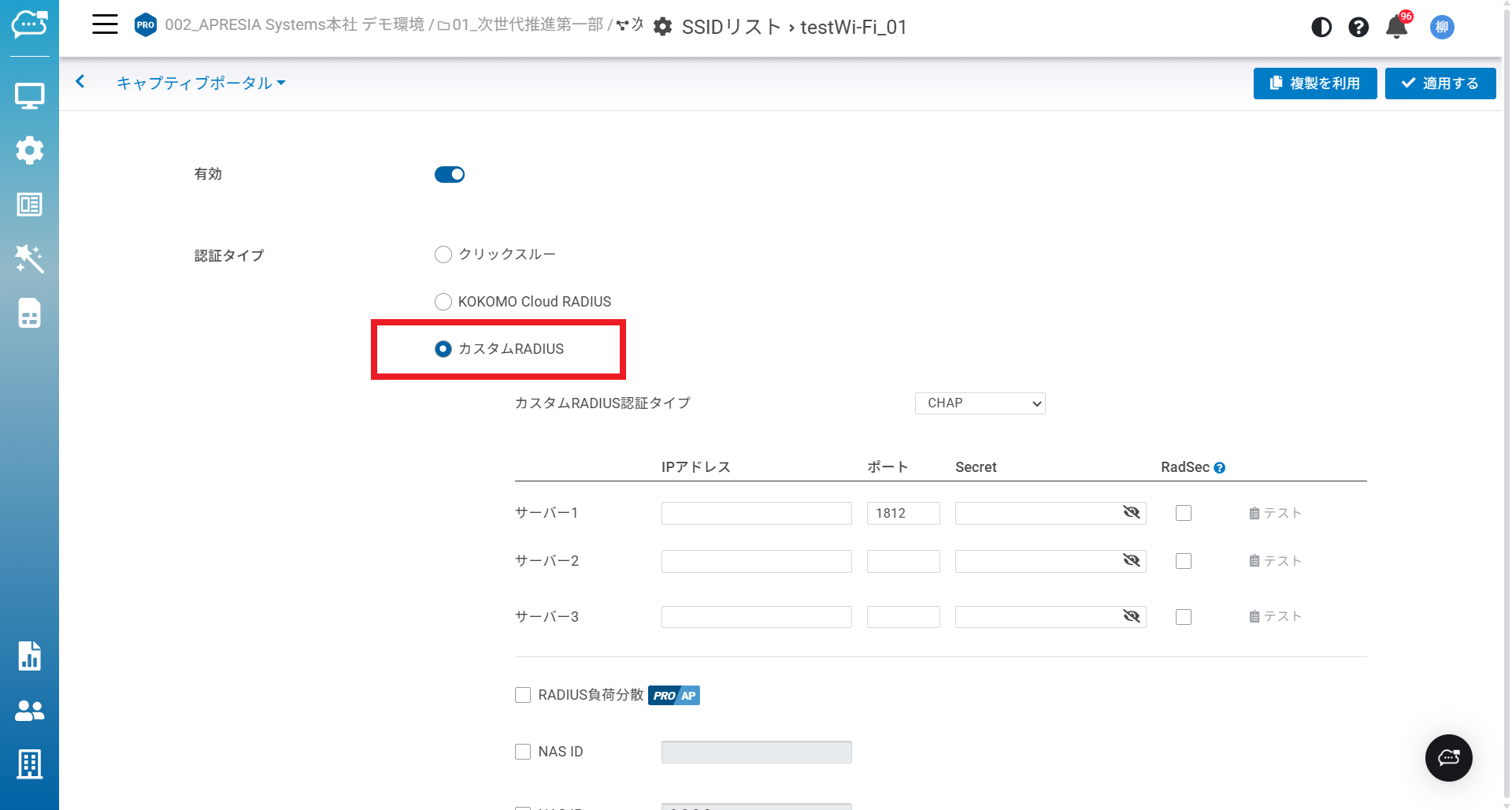
キャプティブポータルの認証にカスタムRADIUSを使用するには、「**設定**」>「**アクセスポイント**」>「**SSID**」>「**キャプティブポータル**」>「**認証タイプ**」で「**カスタムRADIUS**」を選択します。
{% hint style="warning" %}
SSIDのセキュリティタイプ設定で「**WPA2エンタープライズ**」または「**WPA3エンタープライズ**」を選択している場合、キャプティブポータルで対応している認証タイプは「**クリックスルー**」のみです。
{% endhint %}
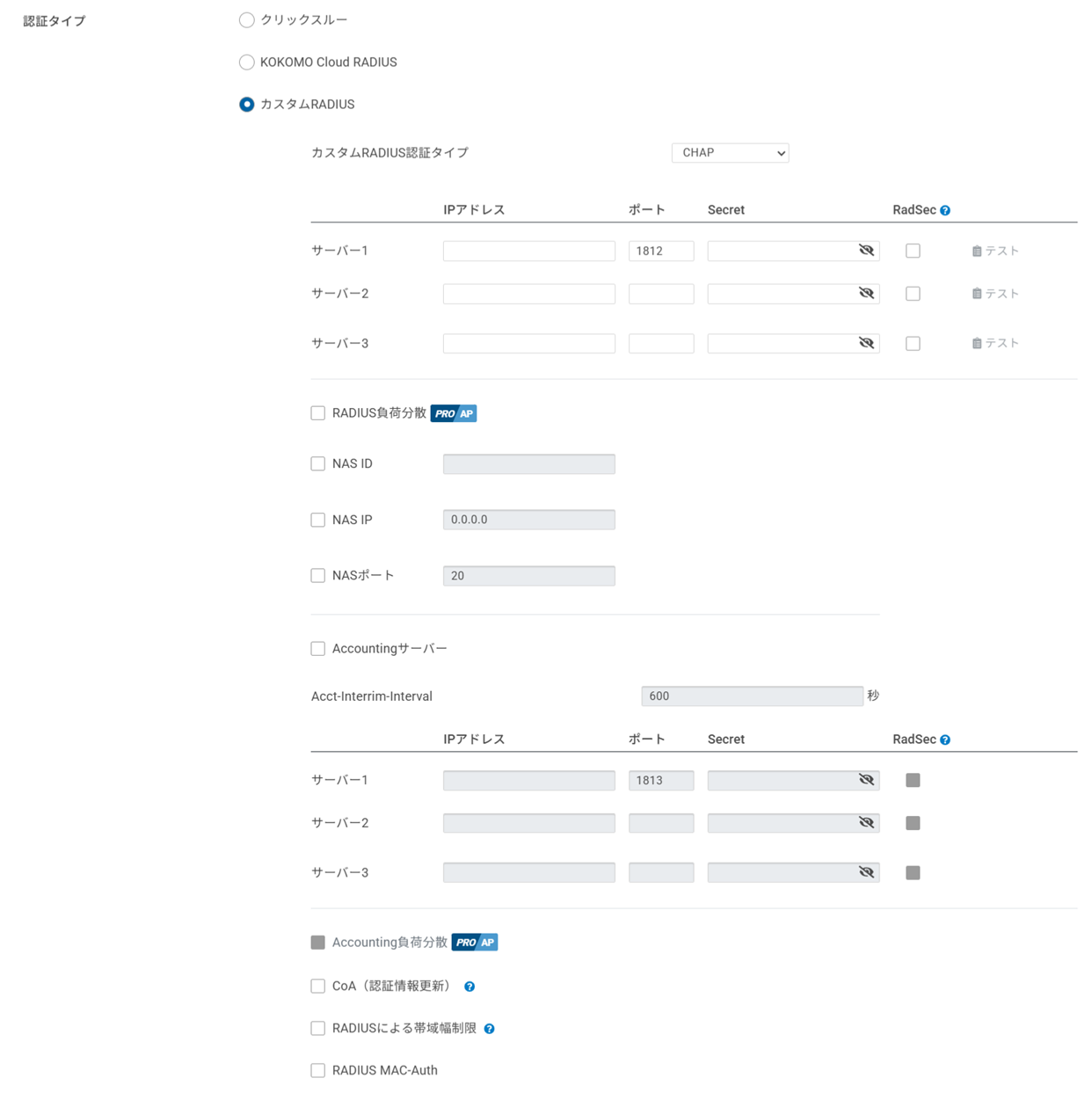
「**カスタムRADIUS**」を選択した場合の設定項目を説明します。
* **カスタムRADIUS認証タイプ:**「CHAP」か「PAP」を選択します。
* **サーバー1**(必須):IPアドレス、ポート番号、Secret(共有シークレット)を設定します。
* **サーバー2**(任意):IPアドレス、ポート番号、Secret(共有シークレット)を設定します。
* **サーバー3**(任意):IPアドレス、ポート番号、Secret(共有シークレット)を設定します。
* **RADIUS負荷分散**:複数台のRADIUSサーバーで認証処理の負荷分散を行います。
* **NAS ID**(任意):アクセスポイントがRADIUSサーバーにアクセスする際の識別子を設定します。
* **NAS IP**(任意):アクセスポイントがRADIUSサーバーにアクセスする際の送信元IPアドレスを設定します。
* **NASポート**(任意):送信元TCPポート番号を設定します。
* **Accountingサーバー**(任意):RADIUSアカウンティングサーバーの有無を設定します。
* **Acct-Interrim-Interval**(任意):RADIUSアカウンティングサーバーへのInterim-Updateフレーム送信間隔を設定します。
* **サーバー1/2/3**(任意):IPアドレス、ポート番号、Secret(共有シークレット)を設定します。
* **Accounting負荷分散**:複数台のRADIUSアカウンティングサーバーでアカウンティング処理の負荷分散を行います。
* **CoA(認証情報更新)**:未サポートです。
* **RADIUSによる帯域幅制限**:未サポートです。
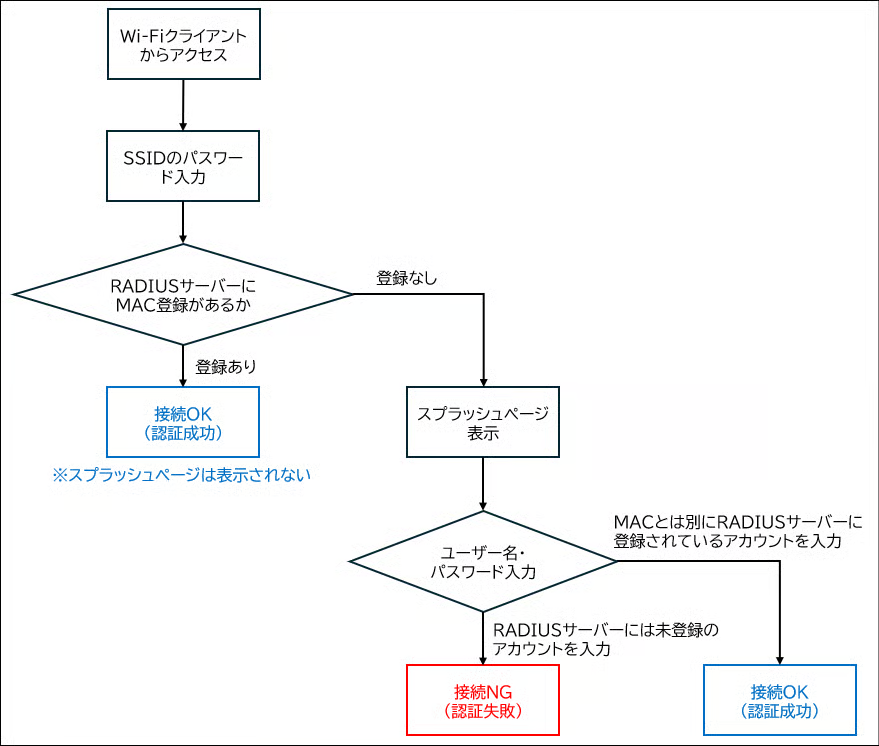
* **RADIUS MAC-Auth**:有効にするとキャプティブポータル認証をMAC認証で迂回可能となります。
この機能により、プリンター、IPカメラ、IoTデバイスなどの会社所有デバイスは自動認証され、一般ユーザーは従来通りポータル認証を行うという運用が実現できます。
* 自動認証によるポータル迂回 - 登録済みMACアドレスのデバイスは、キャプティブポータルを表示せずに即座にネットワークアクセスが許可されます
* ハイブリッド認証フロー - 未知のMACアドレスは通常通りキャプティブポータルへリダイレクトされ、設定済みの認証方式(バウチャー、アカウントなど)での認証が必要になります
* 集中管理 - RADIUSサーバー経由でMACアドレスの許可/拒否、VLAN割り当て、セッションタイムアウトなどを一元管理できます
{% hint style="info" %}
RadSecについては [RadSec証明書](https://docs.lan.kokomocloud.com/security/radsec-certificate.md) を参照してください。
{% endhint %}
{% hint style="danger" %}
キャプティブポータルの「**カスタムRADIUS**」において「**CoA(認証情報更新)**」「**RADIUSによる帯域幅制限**」は未サポートです。
{% endhint %}
---
# Agent Instructions
This documentation is published with GitBook. GitBook is the documentation platform designed so that both humans and AI agents can read, navigate, and reason over technical content effectively. Learn more at gitbook.com.
## Querying This Documentation
If you need additional information that is not directly available in this page, you can query the documentation by asking a question.
Perform an HTTP GET request on the following URL with the `ask` and `goal` query parameters:
```
GET https://docs.lan.kokomocloud.com/configuring-networks/configuring-access-points/configuring-ssids/captive-portal/custom-radius.md?ask=&goal=
```
`ask` is the immediate question: it should be specific, self-contained, and written in natural language.
`goal` is what the user is ultimately trying to achieve, the reason they need the answer. Sharing it helps GitBook give you a better, more relevant answer. A goal is most helpful when it describes the outcome the user wants rather than restating the question. For example, with `ask=how do I create an API token`, a goal like `automate deployments from our CI pipeline` lets GitBook tailor the answer to that use case.
The response will contain a direct answer to the question and relevant excerpts and sources from the documentation.
Use this mechanism when the answer is not explicitly present in the current page, you need clarification or additional context, or you want to retrieve related documentation sections.